


AWS Lambda runs your function code, while AWS CloudFormation defines and manages the function and its related resources, including IAM roles, triggers, and environment variables. This guide explains how to create, deploy, update, troubleshoot, and monitor a Lambda function with CloudFormation.
Key takeaways
- CloudFormation lets you define a Lambda function and its related resources, including its IAM role, in one template and deploy them together as a stack.
- Direct invocation sources like S3 and API Gateway use AWS::Lambda::Permission, while polling sources like SQS and Kinesis use AWS::Lambda::EventSourceMapping.
- CloudFormation detects Lambda code updates by comparing template values, so use a unique S3 key or object version for each build rather than overwriting the same object.
- Review change sets before applying stack updates, and check stack events starting with the earliest failed resource when a deployment fails.
- AWS SAM adds shorter serverless syntax and local testing tools on top of CloudFormation, useful when your app is mostly Lambda-based.
- After configuring Middleware instrumentation through CloudFormation, you can monitor Lambda , errors, duration, and cold starts after every deployment.
What is AWS Lambda CloudFormation?
AWS Lambda CloudFormation means using a CloudFormation template to create, configure, update, and manage Lambda functions and their related AWS resources.
AWS Lambda runs code in response to events without requiring you to manage the underlying servers. AWS CloudFormation lets you define infrastructure in YAML or JSON instead of creating resources manually in the AWS console. Together, Lambda runs the code while CloudFormation creates and manages the function, its IAM role, triggers, environment variables, and other related resources. For the bigger picture on how Lambda fits into serverless design, see Middleware’s guide to serverless architecture.
Some key terms you will often see when working with CloudFormation include:
- Template: The YAML or JSON file that defines the infrastructure
- Stack: The resources created from the template
- Change set: A preview of proposed stack updates
- IAM execution role: The IAM role that grants the Lambda function permission to access AWS services and resources
Keep these terms in mind because they come up throughout the rest of the guide.
How do you create and deploy a Lambda function with CloudFormation?
To create a Lambda function with CloudFormation, define the function, its code, and its IAM execution role in a template, then deploy the template as a stack. In this section, you will create a small Node.js function, deploy it with the AWS CLI, and test the result.
Understand the template structure
A CloudFormation template can have several sections, but this guide uses four basic ones:
AWSTemplateFormatVersionidentifies the CloudFormation template format.Parametersaccepts values when you deploy the stack.Resourcesdefines the Lambda function and its IAM execution role.Outputsreturns useful values after deployment, such as the function name and ARN.
Of all these sections, only Resources is required. The basic structure looks like this:
AWSTemplateFormatVersion: "2010-09-09"
Parameters:
   # Values supplied during deployment
Resources:
   # AWS resources CloudFormation creates
Outputs:
   # Values returned after deployment
To create a Lambda function, the template uses the AWS::Lambda::Function resource type. The properties under this resource tell CloudFormation how to configure the function:
Code: Provides the function code.Role: Specifies the IAM execution role that Lambda assumes.Handler: Tells Lambda which exported function to run.Runtime: Specifies the language runtime.Environment: Adds environment variables.Timeout: Sets how long the function can run.MemorySize: Sets the memory available to the function.
Code and Role are the required properties. This example also uses Handler and Runtime because it deploys a ZIP-based Node.js function.
You will also see three CloudFormation intrinsic functions in the template:
!Refreads a parameter value or returns a resource identifier.!GetAttreturns a specific attribute of a resource, such as an IAM role ARN.!Subinserts parameter, resource, or attribute values into a string.
These functions connect resources and reuse values in the template instead of hardcoding them.
Lambda function CloudFormation example (YAML)
Start by defining the Lambda function, its IAM execution role, and the settings it needs in the CloudFormation template. The example below uses Node.js, sends logs to CloudWatch, and passes the deployment stage as an environment variable.
AWSTemplateFormatVersion: "2010-09-09"
Description: Deploy a Node.js Lambda function with CloudFormation
Parameters:
  Stage:
    Type: String
    Default: dev
    AllowedValues:
      - dev
      - staging
      - prod

Resources:
  LambdaExecutionRole:
    Type: AWS::IAM::Role
    Properties:
      AssumeRolePolicyDocument:
        Version: "2012-10-17"
        Statement:
          - Effect: Allow
            Principal:
              Service:
                - lambda.amazonaws.com
            Action:
              - sts:AssumeRole
      Policies:
        - PolicyName: LambdaLoggingPolicy
          PolicyDocument:
            Version: "2012-10-17"
            Statement:
              - Effect: Allow
                Action:
                  - logs:CreateLogGroup
                  - logs:CreateLogStream
                  - logs:PutLogEvents
                Resource: "arn:aws:logs:*:*:*"

  HelloWorldFunction:
    Type: AWS::Lambda::Function
    Properties:
      FunctionName: !Sub "hello-world-${Stage}"
      Runtime: nodejs22.x
      Handler: index.handler
      Role: !GetAtt LambdaExecutionRole.Arn
      MemorySize: 128
      Timeout: 10
      Environment:
        Variables:
          STAGE: !Ref Stage
      Code:
        ZipFile: |
          exports.handler = async (event) => {
            console.log("Received event:", JSON.stringify(event));
            return {
              message: "Hello from Lambda and CloudFormation",
              stage: process.env.STAGE
            };
          };

Outputs:
  FunctionName:
    Description: Name of the deployed Lambda function
    Value: !Ref HelloWorldFunction

  FunctionArn:
    Description: ARN of the deployed Lambda function
    Value: !GetAtt HelloWorldFunction.Arn
The IAM trust policy allows the Lambda service to assume the execution role, while the inline policy gives the function permission to create and write to its CloudWatch Logs log group.
The function uses Code.ZipFile to store the code directly in the template. CloudFormation places the code in an index.js file, so the handler is index.handler. Inline code works for a small example, while larger functions should use a ZIP package stored in Amazon S3.
The template uses !Ref to read the Stage parameter and return the function name, !GetAtt to retrieve resource ARNs, and !Sub to add the stage to the function name.
How do you deploy and test the stack?
Start by validating the template:
aws cloudformation validate-template
  --template-body file://template.yaml
This checks the template’s syntax and structure, but it does not guarantee that every resource will deploy successfully.
Next, deploy the stack:
aws cloudformation deploy
  --template-file template.yaml
  --stack-name lambda-cloudformation-demo
  --capabilities CAPABILITY_IAM
  --parameter-overrides Stage=dev
The --capabilities CAPABILITY_IAM option acknowledges that the template creates an IAM resource. Without this acknowledgement, CloudFormation returns an InsufficientCapabilities error.
Change Stage=dev to Stage=staging or Stage=prod when deploying another environment. You can also deploy through the CloudFormation console by uploading template.yaml, choosing a stage, and acknowledging that the stack creates IAM resources.
After deployment, check the stack status:
aws cloudformation describe-stacks
  --stack-name lambda-cloudformation-demo
  --query "Stacks[0].StackStatus"
  --output text
A successful deployment returns CREATE_COMPLETE. You can view the function name and ARN in the stack’s Outputs tab. CloudFormation also exposes these values through the describe-stacks command.
Test the function with:
aws lambda invoke
  --function-name hello-world-dev
  --payload '{}'
  --cli-binary-format raw-in-base64-out
  response.json
The command writes the function response to response.json. The --cli-binary-format raw-in-base64-out option lets AWS CLI v2 pass the JSON payload directly.
You can also test the function from the Test tab in the Lambda console and review its logs in the /aws/lambda/hello-world-dev log group in CloudWatch Logs.
How do you add triggers and environment variables?
You add triggers to a Lambda function in CloudFormation with either AWS::Lambda::Permission or AWS::Lambda::EventSourceMapping, depending on how the event source connects to Lambda. You add environment variables through the function’s Environment property.
Lambda invocation permissions
AWS::Lambda::Permission adds a statement to the function’s resource-based policy. Services such as Amazon S3, API Gateway, and EventBridge use this permission when they invoke the function directly. Without the required permission, Lambda rejects the invocation.
Event source mappings
AWS::Lambda::EventSourceMapping connects Lambda to sources that Lambda polls, such as Amazon SQS, Kinesis, and DynamoDB Streams. Lambda reads records from the source and invokes the function with a batch of those records.
The following example connects an SQS queue to HelloWorldFunction:
DemoQueue:
  Type: AWS::SQS::Queue
  Properties:
    QueueName: !Sub "hello-world-queue-${Stage}"
    VisibilityTimeout: 60

SQSEventSourceMapping:
  Type: AWS::Lambda::EventSourceMapping
  Properties:
    EventSourceArn: !GetAtt DemoQueue.Arn
    FunctionName: !GetAtt HelloWorldFunction.Arn
    BatchSize: 10
    Enabled: true
The function’s execution role must also allow Lambda to read and delete messages from the queue. Add this statement to the existing policy under LambdaExecutionRole:
- Effect: Allow
  Action:
    - sqs:ReceiveMessage
    - sqs:DeleteMessage
    - sqs:GetQueueAttributes
  Resource: !GetAtt DemoQueue.Arn
With this configuration, Lambda polls the queue and sends batches of messages to the function. The records appear in the handler’s event object. If your functions need to coordinate multi-step workflows instead of just reacting to single events, pair CloudFormation with AWS Step Functions to orchestrate them.
Environment variables and secrets
Add environment variables through the function’s Environment property:
Environment:
  Variables:
    STAGE: !Ref Stage
    LOG_LEVEL: info
Use environment variables for non-sensitive configuration such as deployment stages, feature flags, and log levels.
Do not store database passwords, API keys, or other secrets directly in the template. Store them in AWS Secrets Manager or Systems Manager Parameter Store, give the Lambda execution role permission to retrieve them, and load them when the function runs.
How do you update a Lambda CloudFormation stack?
You update a Lambda stack by changing the function configuration or deployment package, reviewing the proposed changes, and deploying the updated template.
| Update type | How CloudFormation detects it | What to watch for |
|---|---|---|
| Configuration | Changes to properties like MemorySize, Timeout, Runtime, or Environment | Keep the code compatible with the new settings |
| Inline code | Changes to Code.ZipFile | Best suited to small functions |
| S3 package | A new S3Key or S3ObjectVersion | Use a unique package reference for each build |
| Version or alias | A new version resource or alias target | Confirm that traffic points to the intended version |
Update function configuration and code
Edit the relevant properties in the template:
MemorySize: 256
Timeout: 15
Environment:
  Variables:
    STAGE: !Ref Stage
    LOG_LEVEL: debug
When you change inline code under Code.ZipFile, CloudFormation detects the difference during the next stack update. Confirm that any new runtime is still supported before deploying.
CloudFormation updates Lambda configuration and code through separate API calls. The function may receive requests between those operations, so avoid releasing code that depends on a configuration change becoming active at the exact same time.
Update an S3 deployment package
For an S3-based deployment, point the function to the package with S3Bucket, S3Key, and optionally S3ObjectVersion:
Parameters:
  BuildVersion:
    Type: String

Resources:
  HelloWorldFunction:
    Type: AWS::Lambda::Function
    Properties:
      FunctionName: !Sub "hello-world-${Stage}"
      Handler: index.handler
      Runtime: nodejs22.x
      Role: !GetAtt LambdaExecutionRole.Arn
      Code:
        S3Bucket: my-deployment-bucket
        S3Key: !Sub "hello-world/${BuildVersion}.zip"
CloudFormation does not inspect the contents of an existing S3 object. If the S3Key or S3ObjectVersion stays the same, uploading a new ZIP file may not update the function.
Use a unique package path for each build:
hello-world/build-104.zip
hello-world/build-105.zip
Review updates with change sets
Before deploying, create a change set to review which resources CloudFormation will add, modify, remove, or replace:
aws cloudformation create-change-set
  --stack-name lambda-cloudformation-demo
  --change-set-name update-preview
  --change-set-type UPDATE
  --template-body file://template.yaml
  --parameters
    ParameterKey=Stage,UsePreviousValue=true
    ParameterKey=BuildVersion,ParameterValue=build-105
  --capabilities CAPABILITY_IAM
Review it:
aws cloudformation describe-change-set
  --stack-name lambda-cloudformation-demo
  --change-set-name update-preview
Check the Action field for Add, Modify, or Remove. For modified resources, review Replacement to see whether CloudFormation must create a new resource.
After confirming the changes, execute the change set:
aws cloudformation execute-change-set
  --stack-name lambda-cloudformation-demo
  --change-set-name update-preview
Use versions and aliases for safer updates
A Lambda version is an immutable snapshot of a function’s code and configuration. An alias is a stable name, like prod, that points to a published version.
After publishing a new version, update the alias to direct traffic to it. If the release fails, point the alias to the previous version in the CloudFormation template and redeploy the stack. This rolls back function traffic without rolling back the entire stack.
You can also attach provisioned concurrency to a version or alias when the function needs predictable startup latency.
AWS SAM vs CloudFormation: Which should you use?
AWS CloudFormation is a general infrastructure-as-code service, while AWS SAM extends CloudFormation with shorter syntax and development tools for serverless applications. During deployment, SAM transforms its serverless resources into standard CloudFormation resources.
For example, the Lambda function from earlier can be written in SAM as:
Transform: AWS::Serverless-2016-10-31

Resources:
  HelloWorldFunction:
    Type: AWS::Serverless::Function
    Properties:
      Handler: index.handler
      Runtime: nodejs22.x
      CodeUri: src/
The Transform declaration tells CloudFormation to process the SAM syntax. AWS::Serverless::Function generates an underlying AWS::Lambda::Function, and SAM creates an execution role when you do not provide one. An Events property can also generate resources and permissions for supported event sources.
| Area | CloudFormation | AWS SAM |
|---|---|---|
| Main purpose | Define and manage AWS infrastructure | Simplifies serverless application development |
| Lambda resource | AWS::Lambda::Function | AWS::Serverless::Function |
| Syntax | Explicit resource configuration | Shorter serverless syntax |
| Supported resources | Standard CloudFormation resources | SAM resources and standard CloudFormation resources |
| Local testing | No built-in Lambda emulator | sam local invoke and sam local start-api |
| Deployment | aws cloudformation deploy | sam deploy through CloudFormation |
Use CloudFormation when:
- You want detailed control over resources and permissions.
- Your team already uses CloudFormation as its main infrastructure language.
- You do not need SAM’s local serverless development tools.
Use AWS SAM when:
- Your application mainly uses Lambda and other serverless services.
- You want less template boilerplate.
- You want to build and test functions locally with the SAM CLI.
- You want SAM to generate common event-source and permission resources.
Both options deploy through CloudFormation. SAM mainly reduces serverless configuration and adds commands for building, testing, and deploying Lambda applications.
How do you troubleshoot and roll back a failed deployment?
To troubleshoot a failed CloudFormation deployment, check the stack events, identify the resource that caused the failure, and fix the reason shown in its status message. CloudFormation usually rolls back failed operations automatically, but you may need to resume the rollback when an update cannot return to its previous state.
Common CloudFormation and Lambda errors
| Error or status | What it means | Common causes | What to do |
|---|---|---|---|
CREATE_FAILED | CloudFormation could not create a resource | Invalid configuration, missing permissions, or an unavailable resource | Find the resource that failed first and fix its configuration |
UPDATE_FAILED | CloudFormation could not update an existing resource | Unsupported change, IAM error, missing package, or invalid runtime | Review the status reason, correct the change, and retry |
UPDATE_ROLLBACK_FAILED | CloudFormation could not restore the previous stack state | Missing permissions, resource drift, or a dependency that cannot return to its earlier state | Fix the cause and run continue-update-rollback |
| Deprecated Lambda runtime | Lambda has reached the runtime’s block-create or block-update date | The template uses an unsupported runtime | Move the function to a supported runtime |
| Custom resource failure | A custom resource returned FAILED or did not respond in time | Lambda error, timeout, network issue, or missing response | Check the custom resource function’s logs |
| Nested stack rollback failure | A child stack could not complete its rollback | Failed dependencies, deleted resources, drift, or missing permissions | Review the events in both the parent and child stacks |
After a runtime is deprecated, Lambda later blocks new function creation and then updates according to the runtime’s published deprecation schedule. Lambda-backed custom resources can also fail a stack operation when they return FAILED or do not respond before their timeout.
How do you find out why a stack failed?
The CloudFormation Events tab lists resource operations in reverse chronological order. Look beyond the final stack status and find the resource failure that started the chain of errors.
Focus on these fields:
LogicalResourceId: The resource in the templateResourceStatus: The result of the resource operationResourceStatusReason: The error returned by CloudFormation or the underlying AWS service
You can retrieve the same information with:
aws cloudformation describe-stack-events
  --stack-name lambda-cloudformation-demo
  --query "StackEvents[].[Timestamp,LogicalResourceId,ResourceStatus,ResourceStatusReason]"
  --output table
After identifying the failed resource, check the related Lambda configuration, IAM role, S3 package, nested stack, or CloudWatch logs. The ResourceStatusReason field is usually the best starting point for CloudFormation describe-stack-events troubleshooting.
How do you recover a failed rollback?
CloudFormation uses several rollback states:
ROLLBACK_COMPLETEmeans it finished undoing a failed stack creation. Fix the issue, then delete and recreate the stack.UPDATE_ROLLBACK_COMPLETEmeans it successfully restored the previous stack state.UPDATE_ROLLBACK_FAILEDmeans it could not finish restoring one or more resources, so the stack cannot accept another update.
After fixing the resource that blocked the rollback, continue it with:
aws cloudformation continue-update-rollback
  --stack-name lambda-cloudformation-demo
If the rollback still cannot continue, you can skip a failed resource:
aws cloudformation continue-update-rollback
  --stack-name lambda-cloudformation-demo
  --resources-to-skip HelloWorldFunction
Use --resources-to-skip only as a last resort. CloudFormation marks the skipped resource as complete without restoring it, which can leave the deployed resource out of sync with the template.
For a resource inside a nested stack, use the format NestedStackName.ResourceLogicalId and run the command against the root stack rather than the nested stack.
What are the best practices for Lambda CloudFormation?
- Use parameters instead of hardcoded values: Put values that change between environments, such as stage names, memory size, and resource names, in
Parameters. - Follow least-privilege IAM: Grant only the actions and resources the function needs. Avoid wildcard actions and resources unless AWS requires them.
- Use versioned S3 packages: Give each deployment package a unique key or object version so CloudFormation detects code changes.
- Validate templates before deployment: Run
validate-templateto catch syntax and structural errors before deploying. - Review change sets: Check whether CloudFormation will add, modify, remove, or replace resources before applying an update.
- Keep secrets outside templates: Store secrets in Secrets Manager or Parameter Store and retrieve them at runtime.
- Store templates in version control: Review infrastructure changes through pull requests and keep a clear change history.
- Monitor every deployment: A successful stack status confirms that CloudFormation completed the deployment, not that the function works correctly.
How do you monitor AWS Lambda with Middleware?
You monitor a Lambda function deployed with CloudFormation by connecting your AWS account to Middleware, instrumenting the function, and tracking its metrics, logs, and traces after each stack update. For a broader view of AWS observability strategy beyond Lambda, see Middleware’s AWS monitoring best practices guide.
What should you monitor?
For a deeper look at what each CloudWatch metric measures, see Middleware’s guide to AWS CloudWatch metrics. The main areas to monitor are:
- Invocations: How often the function runs
- Errors: Failed invocations and changes in the error rate
- Duration: Execution time, including p95 and p99 latency
- Throttles: Invocations rejected because the function reached a concurrency limit
- Cold starts: Delays when Lambda initializes a new execution environment
- Downstream latency: Time spent waiting for databases, APIs, queues, and other services
A CREATE_COMPLETE or UPDATE_COMPLETE status only confirms that CloudFormation finished the deployment. It does not confirm that the function works correctly once it starts handling requests.
Lambda sends default metrics to CloudWatch and writes output to CloudWatch Logs when its execution role has the required permissions. If you’re weighing whether to stay on native tooling, see how Middleware compares to CloudWatch for monitoring.
Middleware’s serverless monitoring extends this with unified metrics, logs, and traces built for short-lived, event-driven functions like Lambda.
Add Middleware instrumentation through CloudFormation
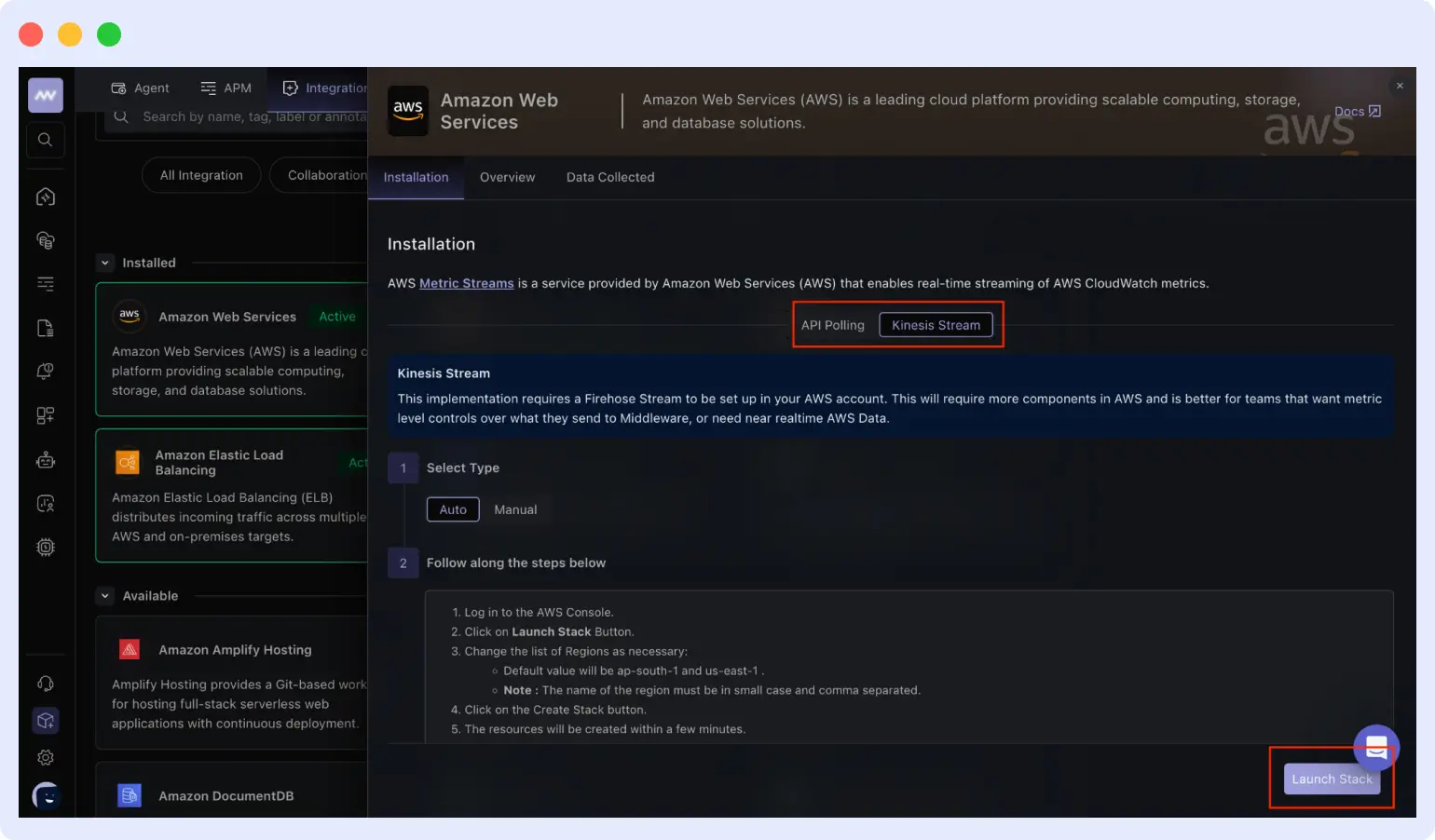
Start by connecting your AWS account through the Middleware AWS integration, which offers two options:
- Kinesis Stream: Uses CloudWatch Metric Streams and Amazon Data Firehose. Middleware’s Launch Stack option deploys the required resources through a CloudFormation template and provides faster metric delivery.
- API Polling: Collects CloudWatch data through AWS APIs without requiring a CloudWatch Metric Stream or Firehose delivery stream. It may suit teams that want to create fewer monitoring resources in their AWS accounts.
Middleware lets you use either option or both, depending on your monitoring needs.
After connecting the account, add function-level OpenTelemetry instrumentation to each Lambda function you want to monitor. Middleware’s Node.js setup uses a Collector layer, an auto-instrumentation layer, environment variables, and a configuration file. This does not require changes to the function’s business logic.
Follow the Middleware AWS Lambda setup guide for the current environment variables, layer order, and configuration file. Get the latest layer ARNs for your Region, architecture, and runtime from the official OpenTelemetry Lambda releases because these values may change.
Add the same layer and environment variable settings to the HelloWorldFunction resource in your CloudFormation template. This keeps observability consistent across all environments deployed from the same template instead of relying on manual configuration. For a complete walkthrough with screenshots, including a real production debugging example, see Middleware’s step-by-step guide to AWS Lambda observability.
Monitor deployments and create alerts
After deployment, use Middleware to:
- Confirm that Middleware is receiving telemetry from the function
- Compare errors and duration before and after an update
- Trace slow or failed invocations across downstream services with distributed tracing
- Review logs related to failed requests
- Detect cold starts and throttling
- Check a new version before moving more traffic to it
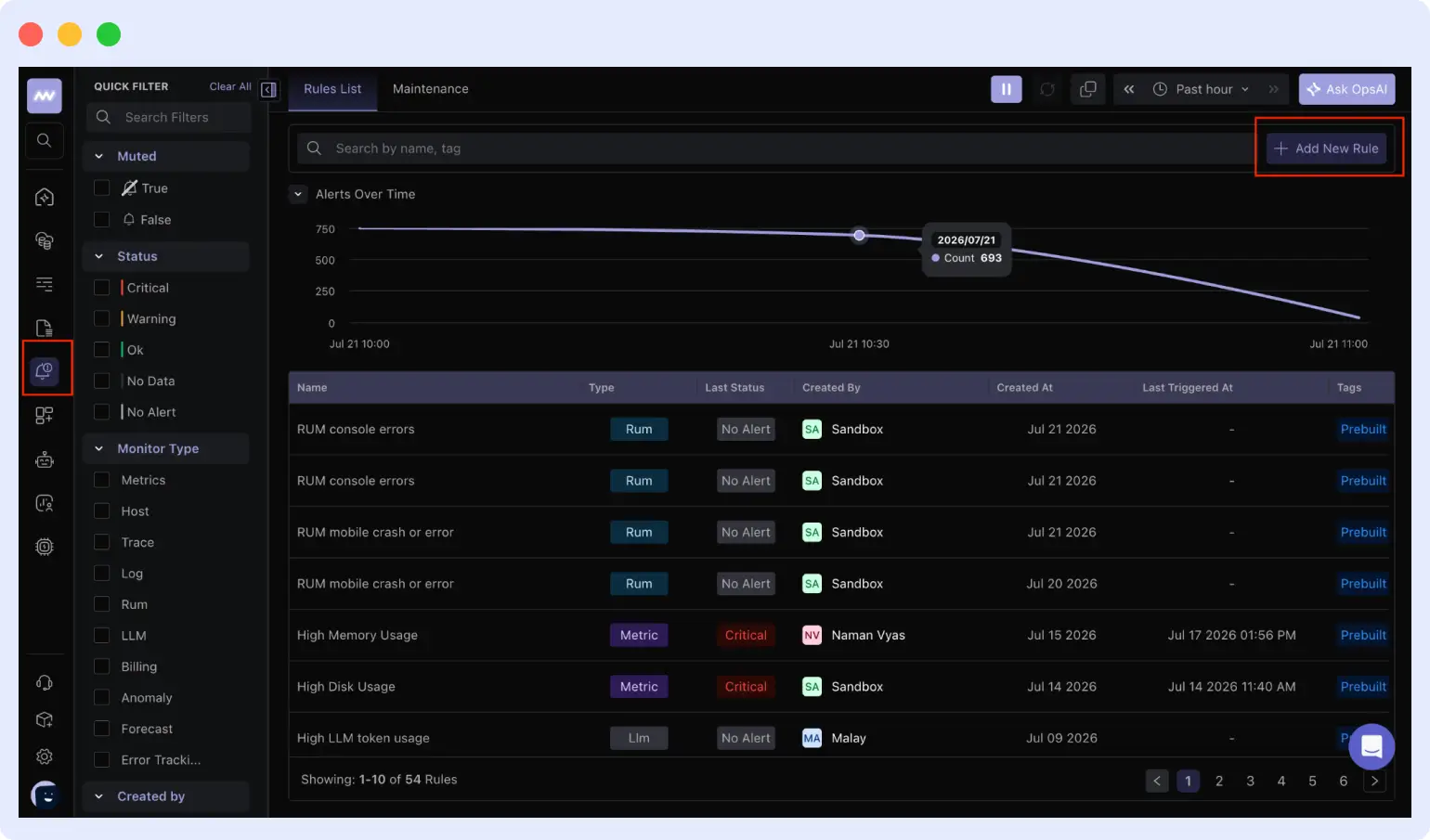
Create alerts for rising error rates, high duration, throttling, frequent cold starts, failed downstream requests, or missing telemetry. Middleware alerts can notify your team when these conditions occur.
If performance drops after a stack update, use the telemetry to decide whether to fix the release or point the production alias to a previous version through CloudFormation.
FAQs
What is the difference between AWS Lambda and CloudFormation?
AWS Lambda runs code in response to events, while AWS CloudFormation creates and manages AWS resources from a template. Lambda runs the function. CloudFormation deploys and configures it.
Can CloudFormation update Lambda function code?
Yes. CloudFormation updates a Lambda function when the Code property changes. This can be a change in inline ZipFile code, a new S3Key or S3ObjectVersion, or a new container ImageUri.
Why is CloudFormation not updating my Lambda code?
The S3Key or S3ObjectVersion in the template may not have changed. CloudFormation does not automatically detect that you replaced the file stored at an unchanged S3 location. Use a unique key or object version for each build.
What does UPDATE_ROLLBACK_FAILED mean, and how do I fix it?
It means CloudFormation could not restore the previous stack state after an update failed. Fix the resource, permission, or dependency causing the rollback failure, then run aws cloudformation continue-update-rollback; use --resources-to-skip only as a last resort.
How do I find out why a CloudFormation stack update failed?
Open the stack’s Events tab or run aws cloudformation describe-stack-events, then find the earliest failed resource event and read its ResourceStatusReason.
Can CloudFormation deploy a Lambda function from a container image?
Yes. Set PackageType to Image and provide the Amazon ECR image URI through Code.ImageUri; image-based functions do not use the Handler and Runtime properties.