
Mobile apps run across a wide range of devices, operating systems, and network conditions. A feature that works perfectly on test hardware can fail for users on older phones or unstable connections, making consistent performance difficult to guarantee.
Mobile app synthetic testing helps teams monitor performance by simulating real user interactions across devices, operating systems, and network conditions.
Unit and integration tests validate code and APIs, but they don’t capture what happens when connectivity drops mid-session or when the network slows unexpectedly.
Synthetic testing fills this gap by continuously validating critical user flows in production-like conditions. When combined with Real User Monitoring (RUM), it provides complete visibility into mobile app performance.
What Is Mobile App Synthetic Testing?
Mobile app synthetic testing uses automated scripts to simulate user interactions with an app. These tests perform actions such as logging in, browsing content, completing transactions, or calling backend APIs, and run on schedules from different locations and devices.
Because the traffic is simulated rather than generated by real users, synthetic testing acts as a continuous health check, confirming that key functionality and performance remain within expected thresholds.
📘Learn the fundamentals of synthetic monitoring and how it helps keep mobile apps reliable. Check out What Is Synthetic Monitoring?
Why Synthetic Testing Matters for Mobile Apps
Mobile apps operate in far more variable conditions than web applications. Users access them from hundreds of device models, across multiple OS versions, and over constantly changing network connections. A single session may start on Wi-Fi and continue on a slow or unstable mobile network.
Testing every possible combination manually isn’t feasible. Synthetic testing provides repeatable, automated coverage of the most critical user paths. By continuously validating these flows under varying conditions, teams can detect slow responses, failed APIs, and performance regressions before users are affected, helping ensure a reliable experience across devices and locations.
Common Use Cases for Synthetic Testing in Mobile Apps
Synthetic testing is used to proactively validate mobile app performance, availability, and reliability by simulating critical user actions under controlled conditions. It is commonly applied across both backend services and user-facing workflows.
Start by monitoring critical mobile app flows using Middleware. See how to set up synthetic monitoring for APIs, browsers, and multi-step workflows.
1. Testing Critical User Journeys Before Release
Synthetic tests simulate key mobile user flows such as login, onboarding, search, and checkout. Running these journeys across devices and network conditions helps teams detect functional or performance regressions before deploying updates.
2. Uptime and Availability Monitoring
Scheduled synthetic checks continuously verify that mobile apps and supporting APIs are reachable. If a core service becomes unavailable, alerts are triggered before real users are affected.
🚨 Detecting issues is only half the job.
Learn how to fix application performance issues using traces, logs, and automated root-cause analysis.
3. Load and Stress Testing
Synthetic testing can simulate multiple users performing the same action simultaneously. This helps teams evaluate backend scalability and identify bottlenecks under high traffic conditions.
4. Testing Under Different Network Conditions
By simulating slow, unstable, or degraded network connections, synthetic tests reveal how mobile apps behave on poor connectivity. This supports optimization of retries, caching strategies, and load behavior.
5. Validating API Reliability
Because mobile apps rely heavily on APIs, synthetic testing ensures backend endpoints remain fast and consistent. It detects latency spikes, authentication failures, and timeout errors early.
Synthetic testing answers “Will this work?” while Real User Monitoring answers “Did this affect users?”
What Types of Synthetic Tests are used for Mobile Apps?
Mobile app synthetic testing includes API, browser, uptime, and transaction tests, each validating a different layer of performance and reliability.
- API Tests: API synthetic tests simulate requests to backend endpoints and verify response times, status codes, and data accuracy. In mobile apps, these tests validate authentication, data fetching, payments, and any backend service the app depends on.
- Browser Tests: Browser synthetic tests simulate real user interactions in a mobile browser. They render pages, interact with UI elements, and validate mobile web performance and critical workflows such as navigation, form submission, and checkout.
- Uptime Tests: Uptime tests run lightweight availability checks at regular intervals. They confirm that mobile apps and supporting APIs are reachable from multiple geographic regions and alert teams when a service becomes unavailable.
- Transaction Tests: Transaction synthetic tests simulate complete end-to-end user workflows across multiple steps. They validate complex processes like login, onboarding, checkout, or form submission, ensuring every step in the journey functions correctly.
🧠 New to APM?
Here’s a simple explanation of what Application Performance Monitoring (APM) is and how it helps diagnose mobile app slowdowns.
Synthetic Testing for Mobile Apps with Middleware
Mobile apps depend heavily on backend APIs for authentication, data access, and core functionality. Middleware synthetic testing continuously validates these APIs to ensure they respond correctly and perform consistently across regions and network conditions.
By running synthetic tests from multiple locations, teams can detect latency spikes, failures, or regional performance issues before they impact users.
API Synthetic Tests
API synthetic tests validate backend reliability by simulating real API requests and verifying response behavior.
Middleware supports multiple protocols, including HTTP, SSL, DNS, TCP, WebSocket, UDP, ICMP, and gRPC. This allows teams to monitor REST APIs, real-time WebSocket connections, DNS resolution, and gRPC services used by mobile applications.
Each test provides detailed network timing breakdowns and response-time metrics by location. This visibility helps identify whether performance issues are tied to specific regions or network conditions.
Simulating Realistic User Flows with Multi-Step API Tests
Mobile app actions rarely trigger a single API call. A login, search, or checkout flow typically involves multiple dependent requests.
Multi-step API synthetic tests allow teams to simulate these workflows by passing data from one step to the next. This mirrors real user behavior and validates complete end-to-end transactions.
Example:
An e-commerce app can simulate a checkout flow by:
- Processing payment
- Authenticating the user
- Fetching the user’s cart
- Applying a promo code
Each step depends on the response from the previous one, ensuring the entire flow works as expected.
Setting Up API Synthetic Tests
Setting up API synthetic tests involves defining request details, success criteria, and alerting rules to validate backend performance and availability continuously.
Single-Step API Tests
To create a single-step API monitor, navigate to the Synthetic Monitoring tab and click “Add New Test.” You’ll start by selecting your protocol: HTTP, SSL, DNS, WebSocket, UDP, ICMP, TCP, or gRPC.

For HTTP tests, you define the name, environment tags, HTTP method, and target URL. Under Advanced Options, you can configure request headers and cookies for authentication, query parameters, request body for POST/PUT/PATCH requests, HTTP version, timeout settings, redirect behavior, and certificate validation.
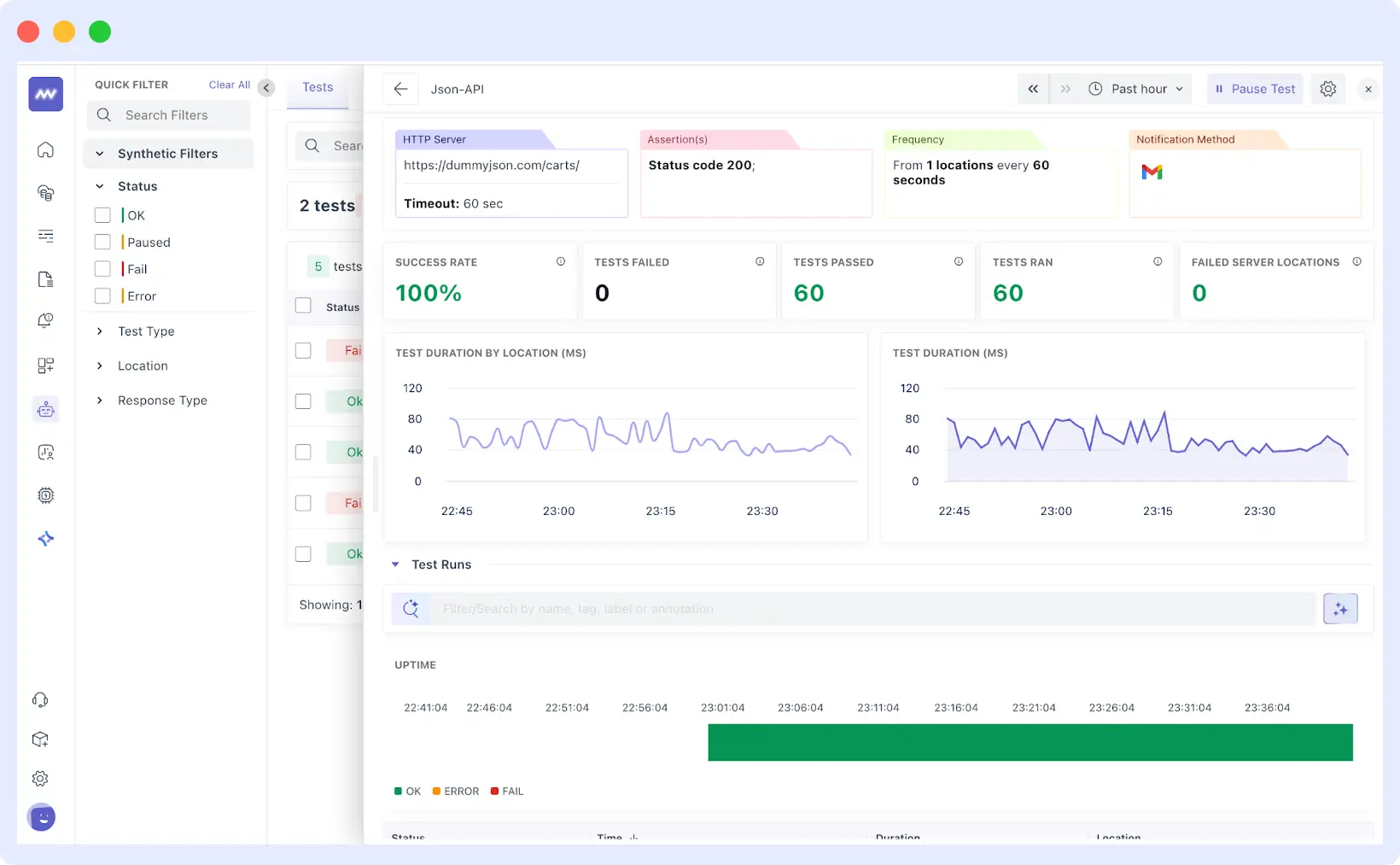
Assertions define what counts as success. Set expected status codes, maximum response times, required response fields, or specific header values. Most tests check for a 200 status code, acceptable response times, and the presence of key data fields.
Finally, select locations to run tests from different geographic regions and set the monitoring frequency based on your needs. Configure alert destinations (email, Slack, PagerDuty, Opsgenie) and define how many consecutive failures trigger notifications.
Multi-Step API Tests
Multistep Synthetic Monitoring also allows you to add multiple API steps to a single monitor, such that subsequent steps may reuse information in successive responses (e.g. take one category of product in Step 1 and pass it into Step 2). This works best in simulating the multi-call transactions and end-to-end flows.
When you create your first step and preview the response, the VARIABLES panel lists fields the monitor can reference later. Variables are referenced with the step index and field name, e.g., {{$0.category}}.
You then add subsequent steps and paste these into URL, Query Params, Headers, or Request Body of subsequent steps to chain behavior.
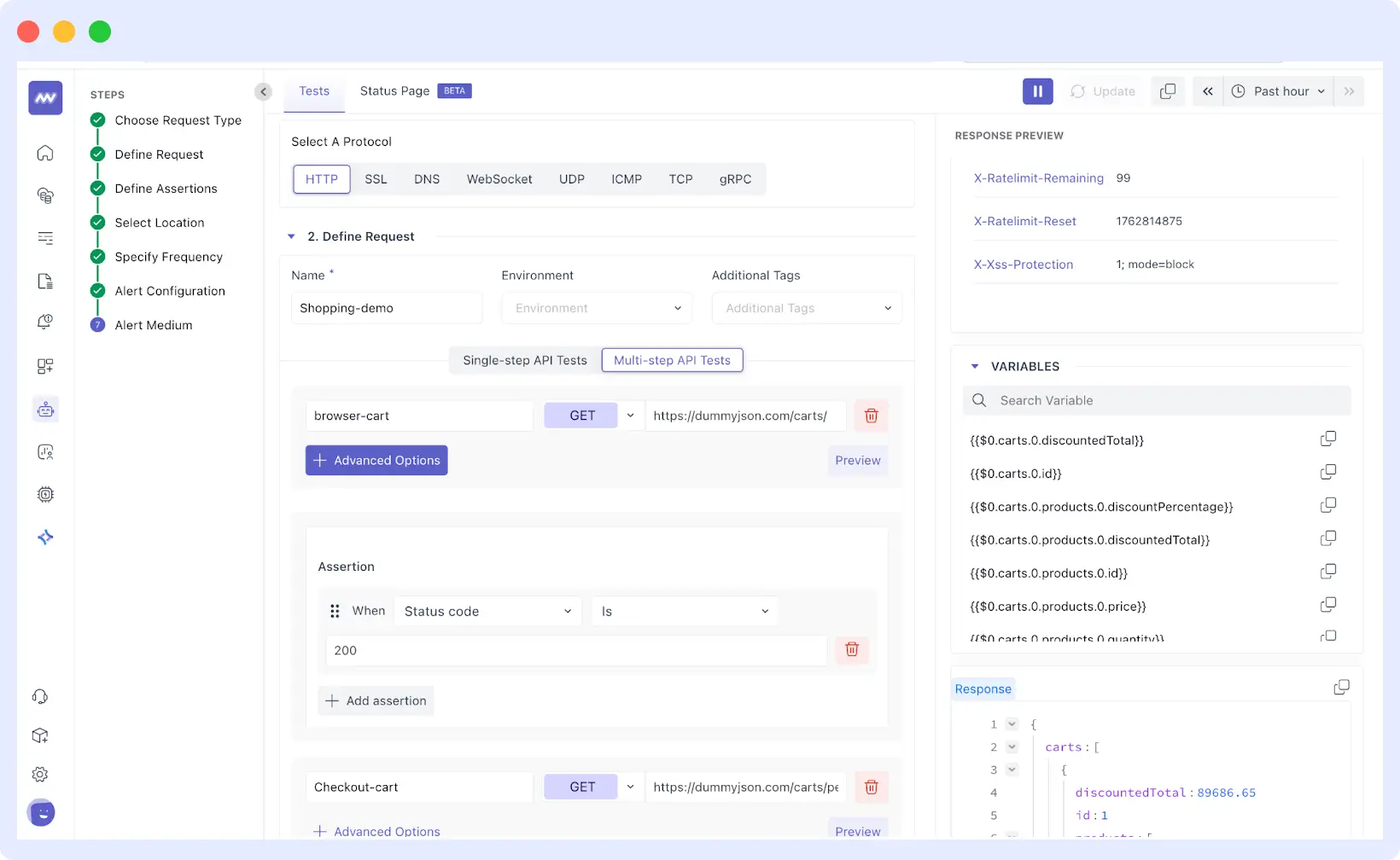
For example, your first step might call a products API that returns a category ID. Step two uses that category ID to fetch items in that category. Step three uses a product ID from step two to get detailed information. Each step depends on data from the previous one, mirroring how users navigate through your app.
Because assertions are global in multistep today, design them to fit every step’s response. Set assertions that work across all steps, like status codes or response time thresholds, rather than step-specific validations.
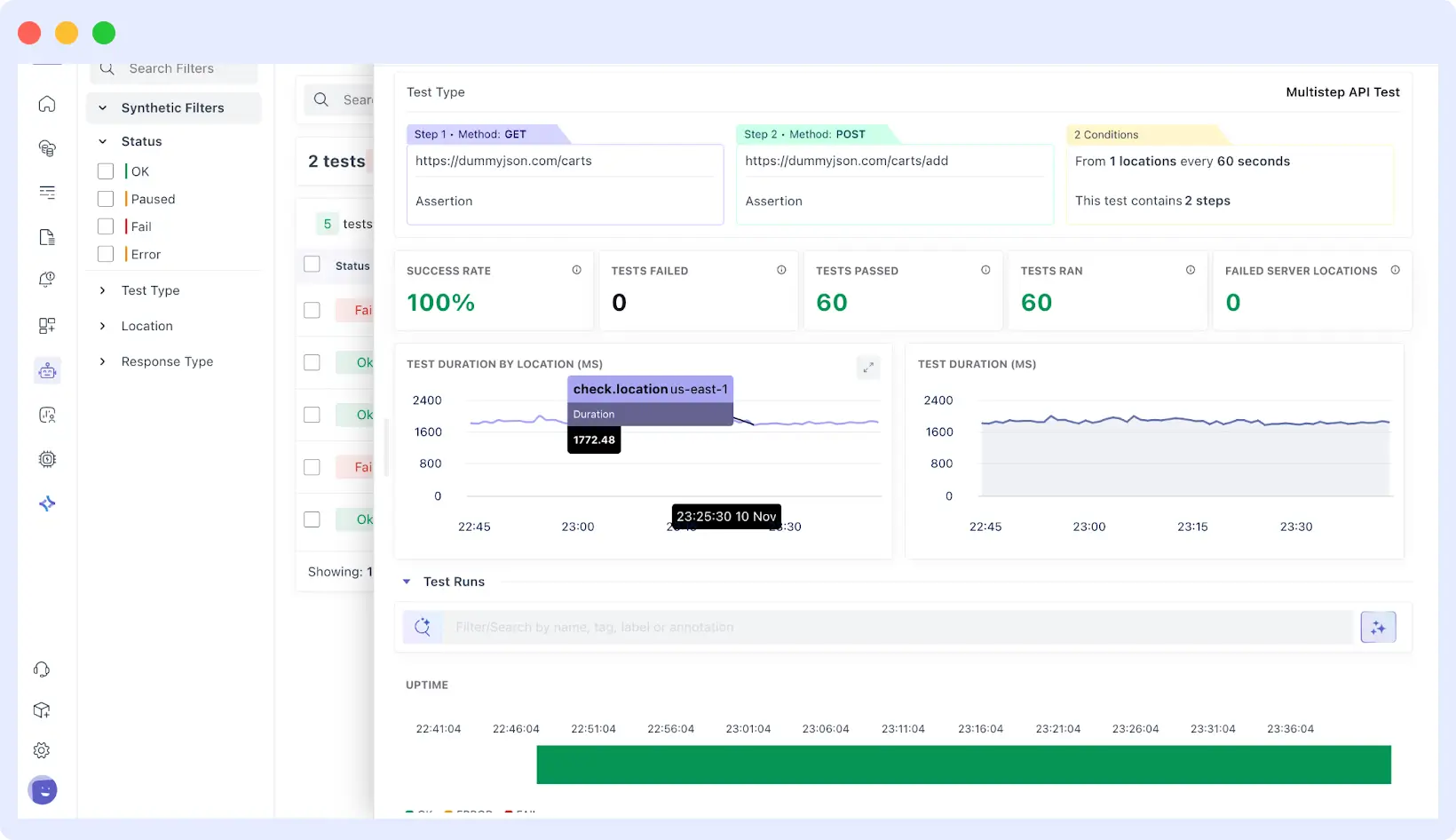
Location, frequency, and alert configuration work the same as single-step tests.
⚙️Learn how to configure single-step and multi-step synthetic tests in detail by visiting our Synthetic Monitoring Documentation.
Browser Synthetic Test
Browser synthetic tests simulate real user interactions in mobile web apps and web views to verify page load performance, user flows, and feature reliability. They help teams detect UI and performance issues before users experience them.
Middleware’s browser tests:
- Render pages like a real browser
- Capture screenshots and session replays
- Record clicks, scrolls, and errors
Browser tests track Core Web Vitals and correlate frontend failures with backend traces to speed up troubleshooting. Session replays make it easier to reproduce reported issues and identify behavior patterns such as rage clicks or unexpected drop-offs.
Teams can compare performance and error metrics across deployments to detect regressions early and configure alerts for slow page loads, broken flows, or sudden error spikes.
🌐For a detailed walkthrough on setting up browser tests, see our article on monitoring web app user journeys with browser tests.
Combining Synthetic Testing and RUM for Complete Mobile App Visibility
Real User Monitoring (RUM) captures performance and behavior data from real users as they interact with a live mobile app. Unlike synthetic testing, which runs predefined scenarios in controlled conditions, RUM reflects real-world usage across devices, networks, and locations.
👀Understand how Real User Monitoring complements synthetic tests. Explore RUM Overview for session tracking, error diagnostics, and performance monitoring.
The difference comes down to where the data originates. Synthetic tests run the same scenarios repeatedly and produce consistent results. RUM captures all events that occur when real users interact with the app, which is inherently unpredictable.
Both are essential for complete visibility. Synthetic tests detect and prevent issues before release, while RUM validates performance in production under real conditions. Combined, they provide proactive detection and reactive validation.
🔍 Want to trace slow mobile screens down to backend services?
Explore Application Performance Monitoring (APM) to correlate synthetic tests, RUM, traces, and logs in one place.
Key RUM Capabilities for Mobile Apps
- Session tracking and replays to visualize user interactions and reproduce production bugs.
- Performance monitoring for page loads, Core Web Vitals, and screen transitions.
- Error capture and diagnostics with full context about user actions when errors occurred.
- Device, browser, and location segmentation to identify issues affecting specific user segments.
- Integration with backend traces and logs to trace problems across your entire stack.
⚙️For setup details, see Real User Monitoring with Middleware, or explore RUM vs Synthetic Monitoring for a deeper comparison.
Conclusion
Mobile app performance varies based on device type, network quality, and user location factors that teams can’t fully control. Synthetic testing helps by continuously validating critical user flows before issues reach production.
When combined with Real User Monitoring, synthetic testing provides end-to-end visibility across both simulated scenarios and real user experiences, enabling teams to detect issues early and validate performance in production.
Get started with Middleware to monitor your mobile app using synthetic tests and RUM, or schedule a demo to see how it fits your workflow.