



AWS Lambda enforces more than a dozen limits at once. Most teams only discover the one that matters after a function fails in production.
Some of these limits are hard ceilings that AWS will never raise. Others are soft quotas that scale automatically or on request.
This guide covers every current Lambda quota in one place. It explains what’s fixed, what’s adjustable, and the specific design choices that keep your functions inside them.
Key takeaways
- Function memory ranges from 128 MB to 10,240 MB, and CPU scales proportionally, reaching one full vCPU at 1,769 MB.
- Function timeout is fixed at 900 seconds (15 minutes) per invocation, and there’s no way to raise it, even by request.
- The default concurrency limit is 1,000 executions account-wide, though AWS will raise it into the tens of thousands on request.
- Synchronous invocation payloads cap at 6 MB, while asynchronous invocations are capped at 1 MB.
- Deployment packages cap at 50 MB zipped and 250 MB unzipped including layers, though container images can reach 10 GB.
- Ephemeral storage at /tmp now goes up to 10,240 MB, twenty times the old 512 MB default AWS shipped with for years.
Soft limits vs hard limits
AWS splits Lambda quotas into two categories, and knowing which one you’re dealing with changes how you solve it.
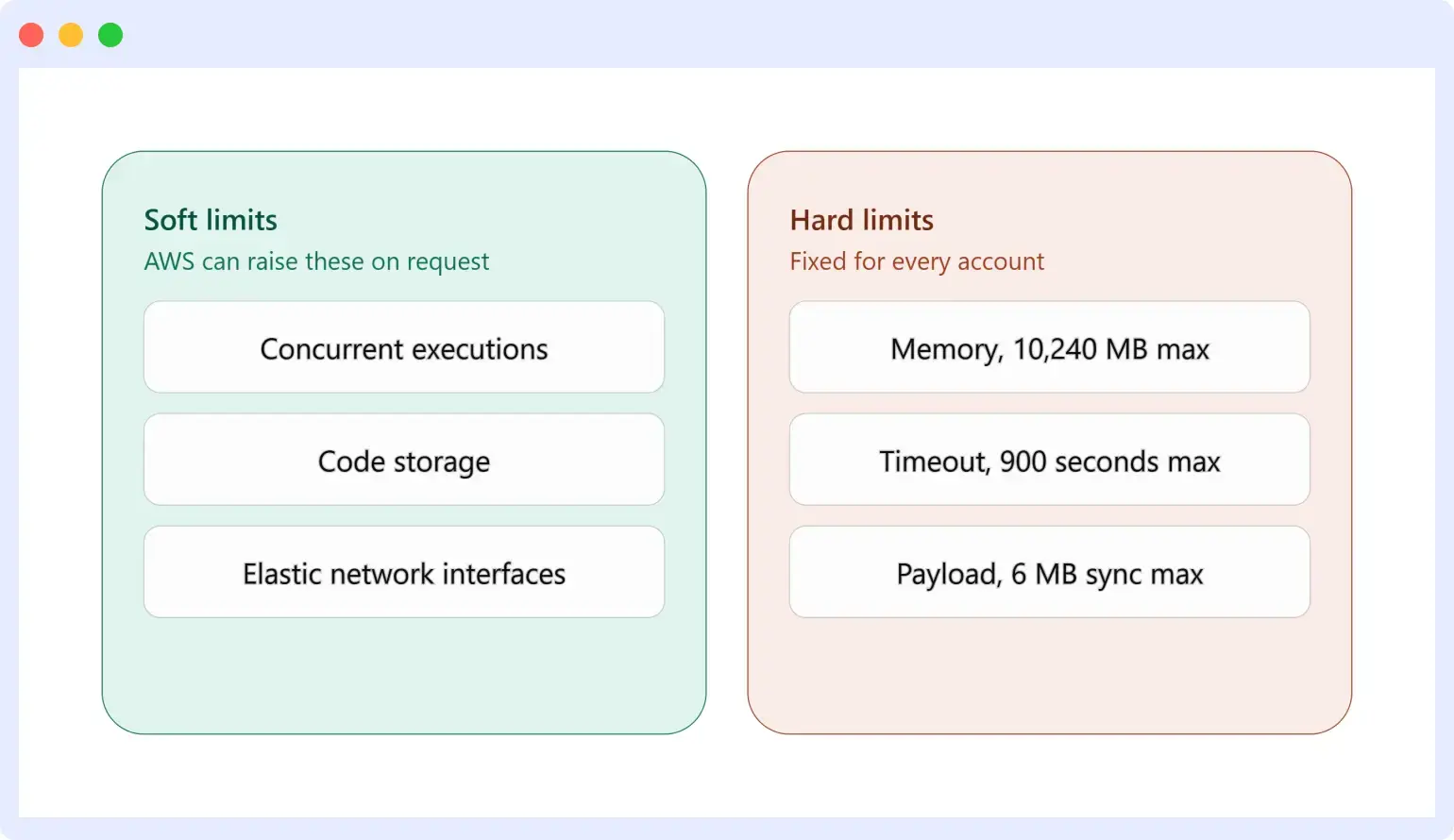
Soft limits protect shared infrastructure, and AWS can raise them through a Service Quotas request. Hard limits apply to function configuration and execution itself, and no support ticket changes them.
Concurrent executions, code storage, and elastic network interfaces are soft limits. Memory, timeout, and payload size are hard limits.
Confusing the two wastes time. Teams sometimes file a support case asking AWS to raise the 900-second timeout, which AWS cannot do, when the real fix is decoupling the workload instead.
AWS Lambda compute and storage quotas (adjustable)
These apply per account, per region, and AWS will increase most of them on request.
| Resource | Default quota | Can be increased to |
|---|---|---|
| Concurrent executions | 1,000 | Tens of thousands |
| Code storage (zip archives and layers, Lambda-managed) | 300 GB unzipped | Not increasable; use self-managed S3 storage beyond this |
| Container image storage | Set by Amazon ECR quotas | Per ECR limits |
| Elastic network interfaces per VPC | 500 | Thousands (shared with services like Amazon EFS) |
| Maximum running durable executions | 1,000,000 | Millions |
AWS Lambda function configuration and execution quotas (fixed)
These apply to every function, and they can’t be changed regardless of account tier or support plan.
| Resource | Quota |
|---|---|
| Function memory allocation | 128 MB to 10,240 MB, in 1 MB increments |
| Function timeout | 900 seconds (15 minutes) |
| Environment variables | 4 KB total, across all variables combined |
| Function resource-based policy | 20 KB |
| Function layers | 5 per function |
| Concurrency scaling | 1,000 new execution environments every 10 seconds, per function |
| Invocation payload | 6 MB request and response (synchronous); 200 MB for streamed synchronous responses; 1 MB (asynchronous) |
| Deployment package (.zip) | 50 MB zipped; 250 MB unzipped including layers and custom runtimes |
| Container image code package | 10 GB maximum uncompressed size |
| /tmp ephemeral storage | 512 MB to 10,240 MB, in 1 MB increments |
| File descriptors | 1,024 (4,096 on Lambda Managed Instances) |
| Execution processes and threads | 1,024 |
| Network bandwidth per execution environment | 625 Mbps by default; non-VPC functions can request more, scaling up to roughly 3,000 Mbps at 10,240 MB memory |
The limits that actually break functions in production
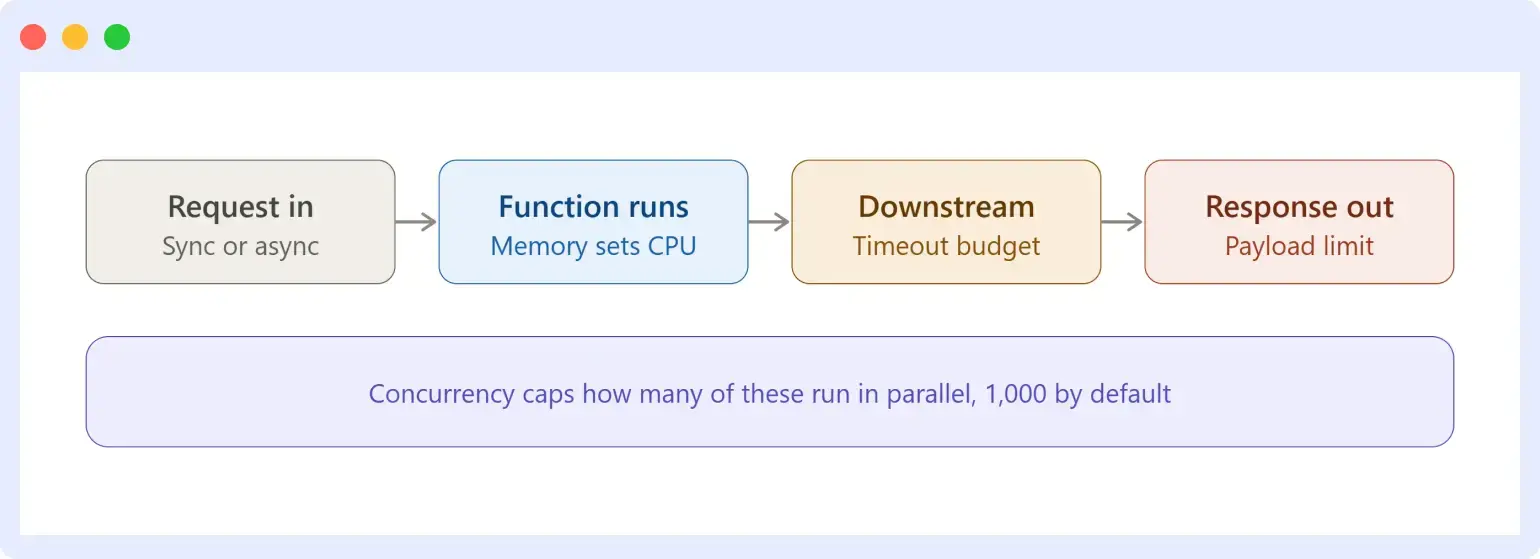
Most of the quotas above never come up in practice. A handful of them decide whether a function works at scale.
Memory and CPU scale together, not independently
Lambda doesn’t let you configure CPU directly. It allocates CPU power in proportion to configured memory.
At 1,769 MB, a function gets the equivalent of one full vCPU. Below that threshold, a CPU-bound function is often memory-starved even if the workload itself uses very little RAM.
Above roughly 1,800 MB, a single-threaded function stops benefiting from more memory, because there’s no second core to use without a multi-threaded design.
Checking the Max Memory Used field in a CloudWatch REPORT line, or running AWS Lambda Power Tuning against real traffic, tells you whether more memory will actually help before you pay for it.
Timeout is 900 seconds, and it’s genuinely fixed
A single Lambda invocation cannot run longer than 15 minutes, full stop. This is the limit teams hit most often, and it deserves its own deep dive rather than a summary here.
For the full breakdown of why functions time out in practice, the three places a request can time out before Lambda’s own clock even runs out, and eight fixes with working code, see our guide to AWS Lambda timeout best practices.
Concurrency is one number shared by every function in the account
The default 1,000 concurrent execution limit applies at the account level, not per function. A traffic spike on one function can starve every other function in the same account and region if nothing else is configured.
Setting reserved concurrency on individual functions caps how much of the shared pool any single function can consume. This is a version of the bulkhead pattern, and it keeps a runaway function from taking others down with it.
Payload size is smaller than most teams expect
Synchronous invocations, the kind behind API Gateway, cap request and response payloads at 6 MB each. Asynchronous invocations, triggered by S3 or EventBridge, are capped much lower at 1 MB.
Streamed synchronous responses get a separate, larger allowance of 200 MB. Bandwidth is uncapped for the first 6 MB of the response, then throttled to 2 MBps beyond that.
Functions that regularly push against these limits usually need to move the payload itself to S3 and pass a reference, rather than passing the data through Lambda directly.
Deployment package size includes your layers, not just your code
A zipped deployment package tops out at 50 MB through the API or console, and the unzipped total, including every layer attached to the function, is capped at 250 MB.
A function can use up to five layers, and it’s common to hit the 250 MB ceiling with a handful of heavier dependencies before the function’s own code even gets large. Container images sidestep this entirely, with a 10 GB uncompressed limit, at the cost of slightly higher cold start latency in most cases.
Ephemeral storage is no longer stuck at 512 MB
Older articles about Lambda limits, including some still ranking today, describe /tmp as a fixed 512 MB. That changed in 2022.
AWS now allows ephemeral storage between 512 MB and 10,240 MB, configurable in 1 MB increments, at a small additional cost above the free 512 MB baseline. Workloads that process large files, cache models, or handle ETL jobs no longer need to route everything through S3 just to work around a storage ceiling that AWS raised years ago.
Network bandwidth is capped per execution environment too
Every execution environment gets 625 Mbps by default, which is easy to miss because it rarely shows up until a function is streaming large files or making many parallel outbound calls.
Functions outside a VPC can request more, and bandwidth then scales with configured memory, reaching roughly 3,000 Mbps at the 10,240 MB ceiling. VPC-attached functions don’t get this increase, which is one more reason to only attach a function to a VPC when it genuinely needs one.
Lambda Managed Instances and MicroVM quotas
AWS Lambda’s newer Managed Instances model runs functions on MicroVMs instead of the standard execution environment, and it carries its own, separate set of quotas.
The headline difference is execution duration. A MicroVM can run for up to 8 hours (28,800 seconds) per execution, compared to the 900-second ceiling on a standard Lambda invocation. That ceiling is fixed and not adjustable, in the same way the 15-minute limit is fixed for classic Lambda.
Memory allocated across all MicroVMs in an account defaults to 400 GB per region, equivalent to 200 MicroVMs at 2 GB each, and can be requested up to 1,024 GB in a handful of regions including US East (N. Virginia), US West (Oregon), US East (Ohio), and Asia Pacific (Tokyo). This quota can also burst up to four times its configured value for short periods.
| Resource | Default quota | Adjustable |
|---|---|---|
| Memory allocated across all MicroVMs | 400 GB per account, per region (1,024 GB in select regions) | Yes |
| Maximum execution duration per MicroVM | 8 hours (28,800 seconds) | No |
| MicroVM images per account, per region | 100 | Yes |
| Versions per MicroVM image | 50 | Yes |
| Concurrent image builds | 5 (10 in select regions) | Yes |
Lambda Managed Instances currently support the ARM64 (Graviton) architecture only. Treat this as a distinct execution model from standard Lambda functions rather than a drop-in replacement, since the two run under different quotas entirely. Check the AWS Lambda documentation directly before sizing a workload against it, since this is one of the newer parts of the Lambda platform and still evolving.
When a workload genuinely outgrows Lambda’s limits
Some workloads aren’t a bad fit for Lambda’s defaults. They’re a bad fit for Lambda’s model entirely.
Here are the options, in order of how much they change your architecture:
- Break the work into smaller invocations. If a task is naturally chunkable, process it in stages and store intermediate state in S3 or DynamoDB between steps, so no single invocation needs the full 15 minutes.
- AWS Step Functions. This orchestrates a series of Lambda invocations as a state machine, with each step staying under its own timeout while the overall workflow runs far longer. See our guide to AWS Step Functions for how the orchestration model works.
- Lambda durable executions. This is a newer addition to the Lambda execution model. Durable executions checkpoint progress so a workflow can suspend for hours or longer while waiting on a callback, without incurring compute charges during the wait, and resume from its last checkpoint on failure. The account-level quota for running durable executions defaults to 1,000,000 and can be raised into the millions, which is a different scaling problem than the 15-minute-per-invocation limit most teams plan around.
- ECS or Fargate. For long-running, compute-heavy processes that don’t fit an event-driven, short-invocation model at all, running the workload as a container removes the timeout question entirely. Our Fargate vs Lambda comparison covers where that tradeoff makes sense.
- AWS Batch. This is purpose-built for large-scale batch and compute-intensive jobs that don’t need Lambda’s event-driven trigger model at all.
For a broader look at where Lambda fits against always-on and container-based compute, see our guide to serverless architecture.
Common Lambda limit errors and what they mean
The error message usually tells you which limit was hit, once you know how to read it.
| Error | Limit it points to | Quick fix |
|---|---|---|
Task timed out after X.XX seconds | Function timeout (900s max) | Find the slow call with a trace, add a per-call timeout, or decouple the work |
RequestEntityTooLargeException | Synchronous payload (6 MB) | Move the payload to S3 and pass a reference instead |
TooManyRequestsException / rate exceeded | Account or function concurrency | Set reserved concurrency deliberately, or request a concurrency increase |
CodeStorageExceededException | Code storage (300 GB unzipped) | Clean up old function versions or move to self-managed S3 storage |
ENILimitReachedException | Elastic network interfaces (500 per VPC) | Request an ENI quota increase, or reduce VPC-attached functions sharing the same subnet |
Function exits with no error, or Runtime exited with error: signal: killed | Memory allocation | Check Max Memory Used in the REPORT line, then raise memory or fix a memory leak |
How to check your current Lambda usage against these limits
Most of these numbers are visible without leaving the terminal.
aws lambda get-account-settings returns both the account’s limits (concurrent executions, total code size, per-function code size) and current usage against them, in one call.
To check a specific adjustable quota, such as concurrent executions, query Service Quotas directly:
aws service-quotas get-service-quota \
  --service-code lambda \
  --quota-code L-B99A9384
Running this on a schedule, or wiring it into a dashboard, turns “we hit a wall in production” into “we saw this coming two weeks out.”
Designing functions that stay inside their limits
- Set reserved concurrency per function so one function’s traffic spike can’t consume the account’s entire shared pool.
- Track code storage and clean up old function versions on a schedule, since the 300 GB ceiling isn’t increasable.
- Give every downstream call inside a function its own short timeout, well under the function’s own configured timeout.
- Right-size memory using power tuning data instead of raising it by default, since more memory only helps CPU-bound work.
- Move large payloads to S3 and pass a reference instead of pushing data through the 6 MB synchronous limit directly.
- Split heavy dependencies into layers, or move to a container image, before a growing deployment package hits the 250 MB unzipped ceiling.
Monitoring AWS Lambda against its limits
CloudWatch reports the metrics that show a limit is close, but it doesn’t connect them to the trace that explains why on its own.
Duration and Max Duration show whether a function is approaching its timeout. Throttles show when concurrency is capped, and requests are being rejected. ConcurrentExecutions shows how much of the shared account pool a function is actually using.
Reading all three together and connecting them to the specific invocation that hit the wall usually means switching between the CloudWatch console and a separate tracing tool like AWS X-Ray.
Middleware’s APM integration for AWS Lambda instruments functions through the OpenTelemetry Lambda layers. It puts duration, memory usage, concurrency, and cold starts in one view alongside traces and logs, so a quota investigation starts with a single dashboard instead of three consoles.
Middleware serverless monitoring tracks these same metrics against the account-level limits above, so a function creeping toward its memory ceiling or the shared concurrency pool shows up as an alert instead of a postmortem.
The same approach works for teams comparing APM tools more broadly, since Lambda is rarely the only service in the request path that needs this kind of correlation.
FAQs
What is the maximum memory for an AWS Lambda function?
The maximum is 10,240 MB, configurable in 1 MB increments starting from 128 MB. This is up from a 3,008 MB ceiling that AWS raised in 2020.
What is the maximum execution timeout for AWS Lambda?
The maximum is 900 seconds (15 minutes) per invocation, and it’s a hard limit that AWS does not increase on request. Workloads that need to run longer use Step Functions or Lambda durable executions instead of a longer single invocation.
What is the maximum payload size for AWS Lambda?
The limit is 6 MB for synchronous request and response payloads, 1 MB for asynchronous invocations, and up to 200 MB for streamed synchronous responses.
Can AWS Lambda limits be increased?
Some can. Concurrency, elastic network interfaces, and durable execution counts are all adjustable through a Service Quotas request. Others, including the memory ceiling, the 900-second timeout, and payload size, are hard limits that apply to every account regardless of support plan.