



“Task timed out after 900.00 seconds.” That line in CloudWatch means your function ran out of time, and depending on where it happened, you might have a partial database write, a duplicate charge, or a customer staring at a blank screen.
AWS Lambda timeouts are rarely about needing more time. Most trace back to a slow downstream call, a missing per-integration timeout, or a function doing more work than it was budgeted for. This guide covers the timeout limits across a serverless request, why functions actually time out, and the specific configuration and code changes that stop it from happening again.
Key takeaways
- AWS Lambda timeout maxes out at 900 seconds (15 minutes), and the default is 3 seconds, which is too short for most real workloads.
- A single request can time out in at least three places: the event source (API Gateway caps at 29 seconds), the function’s own configured timeout, and any downstream service it calls.
- Most Lambda timeouts trace back to a slow or unresponsive downstream dependency, not the function’s own code taking too long to run.
- Function timeout should be set from p95 or p99 duration data, not the average, since averages hide the outliers that actually cause failures.
- SQS-triggered Lambda functions need a visibility timeout of at least 6 times the function timeout to avoid duplicate processing and retry storms.
- Lambda durable functions now let asynchronous workflows run for up to a year without the 15-minute ceiling, a use case Step Functions used to be the only option for.
What counts as a Lambda timeout
A Lambda timeout is the maximum number of seconds AWS lets a single invocation run before it forcibly stops the function. The default is 3 seconds, and you can raise it in 1-second increments up to a hard ceiling of 900 seconds (15 minutes). There’s no way to configure a Lambda function to run longer than that within a single invocation, regardless of memory, provisioned concurrency, or account tier.
When a function hits its timeout, Lambda terminates it immediately, mid-execution. Nothing is rolled back. If the function had already written to a database or called a payment API before the timeout hit, that side effect already happened, even though the invocation as a whole reports as failed. CloudWatch logs the event as Task timed out after X.XX seconds, and the REPORT line shows the billed duration capped at the configured timeout.
How the caller experiences that failure depends on the invocation type. Synchronous invocations, like a request coming through API Gateway, return an error to the caller right away. Asynchronous invocations, like an S3 or EventBridge trigger, are retried automatically up to two more times before Lambda gives up. Event source mappings for SQS, Kinesis, and DynamoDB Streams follow their own retry and visibility timeout rules, which is where a mismatched configuration can quietly duplicate work instead of just failing loudly.
The three places a serverless request can time out
A Lambda-backed application is rarely just a Lambda function. A typical request passes through an event source, the function itself, and one or more downstream services, and each of those has its own timeout behavior.
| Component | Typical limit | What it means for you |
|---|---|---|
| Event source (API Gateway) | 29 seconds, fixed and not configurable | If your function timeout is set higher than 29 seconds behind API Gateway, the caller sees a 504 before Lambda even finishes, and you still pay for the full run. |
| Lambda function | 3 seconds default, 900 seconds maximum | This is the only timeout you configure directly, and it applies to the entire invocation, including cold start initialization. |
| Downstream services (database, third-party API, another function) | Varies by service, often uncapped by default | Without a timeout set on the call itself, the function waits for the dependency’s own timeout or connection limit, not yours, before Lambda’s clock runs out. |
The failure pattern to watch for: a function calls a third-party service that hangs, the function has no per-call timeout so it waits the full 15 minutes, and API Gateway has already returned a 504 to the user at 29 seconds.
The user sees an error, gets billed nothing, but your Lambda function keeps running and you get charged for the full duration. Setting timeouts only at the function level, and not at each integration point, is one of the most common causes of this exact scenario.
Other event sources carry their own fixed limits worth knowing: an Application Load Balancer has a 350-second idle timeout by default, a Lambda function URL follows the same 900-second ceiling as the function itself, and SQS visibility timeout can be set as high as 12 hours, independent of the function’s own timeout (more on why that gap matters in the SQS section below).
Why Lambda functions actually time out
Before changing any configuration, it helps to know which of these is actually happening in your function.
- A downstream call takes longer than expected. A slow query, a third-party API having a bad day, or an S3 download that’s larger than your test data covered. This is the most common cause by a wide margin.
- No per-integration timeout is set. The function’s own timeout is the only backstop, so it waits the full budget on a single call instead of failing fast and retrying or falling back.
- Cold starts eat into the budget. VPC-attached functions, large deployment packages, and heavy SDK initialization outside the handler all add latency before your code even starts running.
- Sequential calls that could run concurrently. Three API calls made one after another instead of in parallel can triple your effective latency for no reason.
- Inefficient database access. A DynamoDB scan instead of a query, or an unindexed SQL query, can be fast enough in testing and slow enough in production to tip a function over its limit.
- Retry storms from missing idempotency. A function that isn’t idempotent and gets retried after a timeout can start doing more work per invocation than it did the first time, making the next timeout more likely, not less.
- Memory set too low for the workload. Lambda allocates CPU proportionally to memory, so an underprovisioned function can be timing out on compute, not I/O.
How to detect and monitor Lambda timeouts
AWS gives you two native tools for this, and they answer different questions.
CloudWatch metrics tell you that timeouts are happening. The Duration and Max Duration metrics show how long invocations are taking over a period, and if Max Duration flatlines at your configured timeout while Error Count climbs in step, that’s a function regularly running out of time rather than failing for other reasons. A CloudWatch Logs Insights query filtering for Task timed out in the log group gives you a count and the specific request IDs to investigate.
AWS X-Ray tells you why. CloudWatch alone won’t show you how long each downstream call inside a function took, which is the detail you actually need to set a correct per-integration timeout. X-Ray traces show the execution time of each S3 call, database query, or HTTP request inside the invocation, so you can see which specific dependency is consuming the timeout budget.
The gap in both tools is correlation. Duration graphs live in one console, traces live in another, and connecting a timeout spike to the specific downstream call and the log lines around it means jumping between three different views. Middleware’s APM integration for Lambda instruments functions through the OpenTelemetry Lambda layers and puts traces, logs, and duration metrics for every invocation in one place, so a timeout investigation doesn’t start with switching consoles.
8 AWS Lambda timeout best practices
1. Set the function timeout from p95 or p99 duration, not the average
Average duration hides exactly the invocations you’re trying to protect against. Ten requests at 3-6 seconds and one outlier at 28 seconds average out to 7.2 seconds, which understates the real risk.
Pull p95 and p99 duration from CloudWatch Logs Insights or your APM tool, set the timeout with headroom above p99, and use the gap between p95 and p99 to decide whether the outlier is worth investigating on its own rather than just padding around it.
2. Give every downstream call its own short timeout
The function timeout is a backstop, not a per-call budget. If a function makes three sequential calls and only the function-level timeout is set, one slow call consumes the entire budget and the other two never get a chance to run, or fail without a clear reason in the logs.
Set an explicit timeout on each HTTP client, database connection, and SDK call, short enough that a single slow dependency fails fast instead of blocking the whole invocation. For synchronous, customer-facing functions behind API Gateway, this usually means 3 to 6 seconds per call, well under the 29-second gateway limit.
3. Use the remaining time in the context object to budget dynamically
Hardcoded per-call timeouts can still be wrong in either direction: too short and a call fails before it had a real chance, too long and there’s no time left for cleanup or a fallback response.
The Lambda context object exposes the actual time remaining in the current invocation, which lets you size each downstream call against what’s actually left instead of a fixed guess.
exports.handler = async (event, context) => {
  const bufferMs = 500; // reserve time to handle the response cleanly
  const remaining = context.getRemainingTimeInMillis() - bufferMs;

  const result = await callDownstreamService(event, { timeoutMs: remaining });
  return result;
};
Reserve a buffer, usually a few hundred milliseconds, so the function still has time to return a meaningful error or write a partial result instead of getting killed mid-response.
4. Match SQS visibility timeout to Lambda timeout with the 6x rule
If a queue’s visibility timeout is set equal to or lower than the Lambda function’s timeout, a message becomes visible to other consumers the instant the function times out, with no gap for backoff or jitter.
That triggers an immediate re-pickup, a rapid retry loop, and a queue that exhausts its retry count and lands in the dead-letter queue faster than the underlying problem could ever be transient. The standard guidance is to set visibility timeout to at least 6 times the Lambda timeout:
Visibility timeout ≥ max(6 × Lambda timeout, retries × Lambda timeout + batching window + startup buffer)
For a function with a 300-second timeout, that puts visibility timeout at a minimum of 1,800 seconds (30 minutes). It looks like a lot of slack, but it’s what actually gives retries, cold starts, and jitter room to resolve without the queue fighting itself.
5. Calculate SQS batch size from timeout and message duration, not intuition
A batch size that’s too large for the function timeout means Lambda gets killed partway through a batch, and every unprocessed message in that batch goes back to the queue for reprocessing. Calculate batch size from the function timeout and the p95 per-message processing time, with a safety margin:
Batch size ≤ (Lambda timeout × 0.8) ÷ p95 per-message processing time
Use p95, not average, for the same reason as the function timeout itself: a handful of outlier messages will skew an average low and leave you with a batch size that looks safe until the batch happens to contain more than one slow message.
Enable ReportBatchItemFailures on the event source mapping so a single failed message in a batch only gets retried on its own, instead of failing and reprocessing the entire batch.
6. Right-size memory instead of just raising it
Lambda allocates CPU proportionally to configured memory, so more memory can genuinely reduce timeout risk, but only for CPU-bound functions. If a function spends most of its time waiting on a database or an external API, more memory won’t speed that up.
Check the Max Memory Used field in the CloudWatch REPORT line to see whether the function is actually memory-constrained, or use AWS Lambda Power Tuning to test a range of memory configurations against real workloads and find the point where duration and cost both flatten out.
7. Move long-running work out of the request path
If a function is regularly approaching its timeout because it’s genuinely doing 10+ minutes of work, the fix usually isn’t a longer timeout. Decouple the long-running part into an asynchronous process: accept the request, hand the heavy work to a queue or a separate workflow, and return immediately.
This keeps customer-facing functions fast and keeps background processing outside the constraints of a single invocation. See the options for workflows that outgrow a single Lambda invocation in the next section.
8. Build in idempotency so retries and timeouts don’t duplicate side effects
A timed-out function can still have written to a database or called a payment API before it was killed. When Lambda or an event source retries that invocation, an idempotent function produces the same result whether it runs once or three times.
Store a unique idempotency key, typically the SQS message ID, a transaction ID, or a hash of the payload, and check it before any external side effect. AWS Lambda Powertools includes an idempotency utility that handles this with a DynamoDB-backed store and a TTL, so you’re not writing the deduplication logic from scratch for every function.
Two real Lambda timeout scenarios, with fixes
The best practices above read as rules. Here is what breaks without them, and the actual code that fixes it.
Scenario 1: a hung third-party call outlives the API Gateway timeout
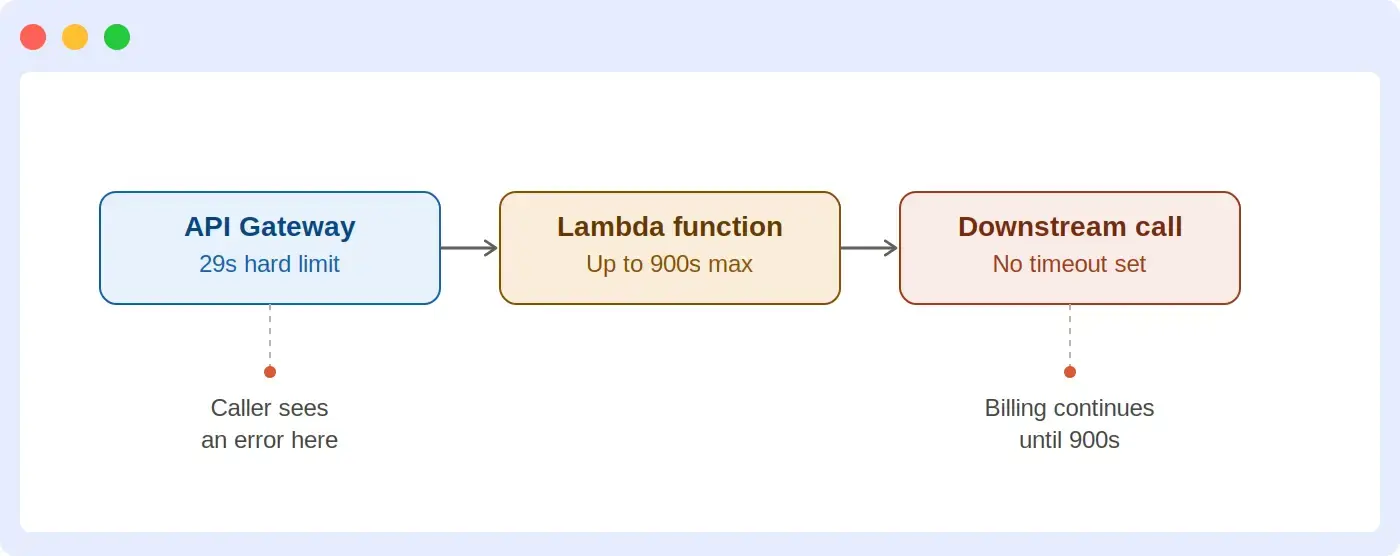
A function behind API Gateway calls a partner API to verify a payload, with no timeout set on that call. The partner API hangs. API Gateway gives up and returns a 504 to the caller at 29 seconds, but the Lambda invocation keeps running toward its own 900-second timeout, doing work nobody is waiting for and racking up billed duration for nothing.
Broken version, no timeout on the downstream call:
export const handler = async (event) => {
  // No timeout here. If the partner API hangs, this call waits on
  // Lambda's own timeout, long after API Gateway has already
  // returned an error to the caller.
  const res = await fetch('https://partner-api.example.com/verify', {
    method: 'POST',
    body: JSON.stringify(event.payload)
  });
  const data = await res.json();
  return { statusCode: 200, body: JSON.stringify(data) };
};
Fixed version, with an explicit timeout well inside the 29-second gateway limit:
export const handler = async (event) => {
  try {
    const res = await fetch('https://partner-api.example.com/verify', {
      method: 'POST',
      body: JSON.stringify(event.payload),
      // Fails fast, well inside the 29-second API Gateway limit,
      // instead of waiting on Lambda's own 900-second timeout.
      signal: AbortSignal.timeout(5000)
    });
    const data = await res.json();
    return { statusCode: 200, body: JSON.stringify(data) };
  } catch (err) {
    if (err.name === 'TimeoutError') {
      return { statusCode: 504, body: JSON.stringify({ error: 'Partner API timed out' }) };
    }
    throw err;
  }
};
The fix does not make the partner API faster. It makes the failure cheap, fast, and visible instead of expensive, slow, and silent.
Scenario 2: sequential calls run out the function’s own timeout
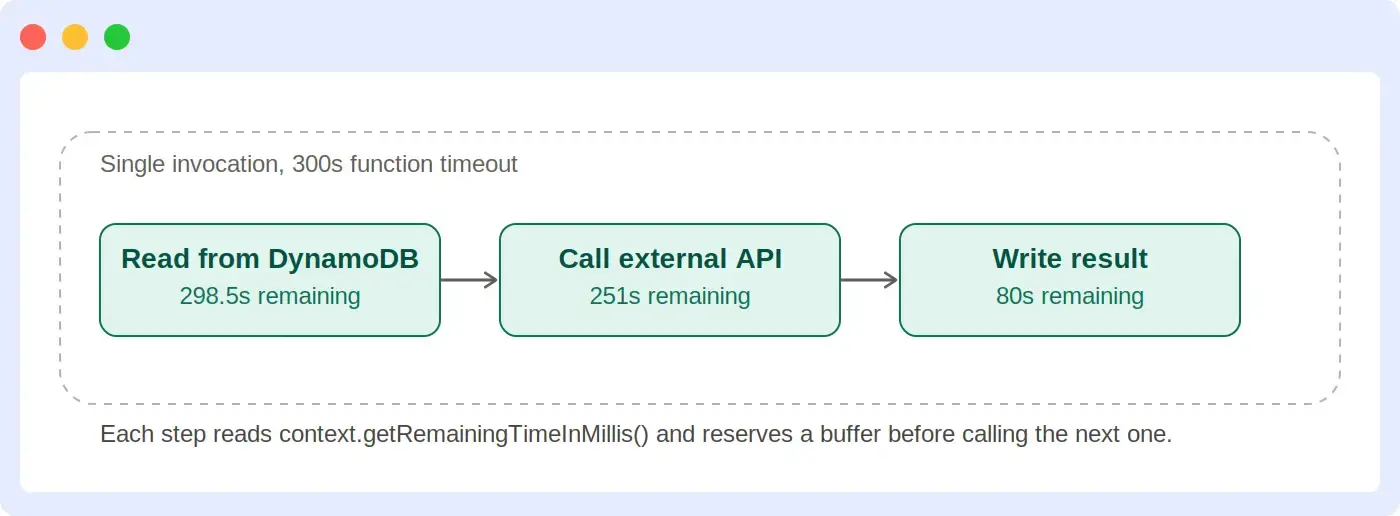
A function reads a record from DynamoDB, calls an external service to verify it, then writes the result back. Each call has a timeout, but they were all hardcoded independently, for example 200 seconds each against a 300-second function timeout.
Three calls at 200 seconds apiece can never all succeed inside a 300-second budget, and worse, a slow first call leaves later calls no room to fail gracefully. Budgeting off the actual remaining time fixes both problems at once.
import { DynamoDBClient, GetItemCommand, PutItemCommand } from '@aws-sdk/client-dynamodb';

const ddb = new DynamoDBClient({});
const BUFFER_MS = 500; // reserve time to return a clean response

export const handler = async (event, context) => {
  // Step 1: read, budgeted off whatever time is actually left
  const t1 = context.getRemainingTimeInMillis() - BUFFER_MS;
  const item = await ddb.send(new GetItemCommand({
    TableName: 'Orders',
    Key: { orderId: { S: event.orderId } }
  }), { abortSignal: AbortSignal.timeout(t1) });

  // Step 2: call an external service with whatever time is left after step 1
  const t2 = context.getRemainingTimeInMillis() - BUFFER_MS;
  const verifyRes = await fetch('https://partner-api.example.com/verify', {
    method: 'POST',
    body: JSON.stringify({ orderId: event.orderId }),
    signal: AbortSignal.timeout(t2)
  });
  const verification = await verifyRes.json();

  // Step 3: write the result with whatever time is left after that
  const t3 = context.getRemainingTimeInMillis() - BUFFER_MS;
  await ddb.send(new PutItemCommand({
    TableName: 'Orders',
    Item: {
      orderId: { S: event.orderId },
      status: { S: verification.approved ? 'approved' : 'rejected' }
    }
  }), { abortSignal: AbortSignal.timeout(t3) });

  return { statusCode: 200, body: JSON.stringify({ status: 'processed' }) };
};
Each step gets whatever time is genuinely left, minus a fixed buffer for returning a response. A slow step 1 automatically tightens the budget for steps 2 and 3, instead of each step blindly waiting on a fixed allowance that was never coordinated with the others.
When 15 minutes isn’t enough
900 seconds is a hard limit for a single Lambda invocation, and it isn’t going up. If a workload genuinely needs more time than that, here are the options, in order of how much they change your architecture.
- Break the work into smaller Lambda invocations. If the task is naturally chunkable, process it in stages and store intermediate state in S3 or DynamoDB between steps, so no single invocation needs the full runtime.
- AWS Step Functions. Orchestrates a series of Lambda invocations as a state machine, with each step staying under 15 minutes individually while the overall workflow runs for up to a year. This is the standard choice for multi-step processes with branching logic, retries, and human approval steps. See our guide to AWS Step Functions for how the orchestration and pricing model works.
- Lambda durable functions. Released in December 2025, durable functions extend the Lambda programming model itself with checkpointing, so a workflow can suspend for hours or months while waiting on a callback or a scheduled delay, without incurring compute charges during that wait, and resume from its last checkpoint on failure. Execution can run up to a year when invoked asynchronously. One catch: if a durable function is invoked through an event source mapping (SQS, Kinesis, DynamoDB Streams), the total execution is still capped at 15 minutes, so workloads that need longer than that go through an intermediary function that invokes the durable function asynchronously instead.
- ECS or Fargate. For long-running, compute-heavy processes that don’t fit an event-driven, short-invocation model at all, running the workload as a container removes the timeout question entirely. Our Fargate vs Lambda comparison covers where that tradeoff makes sense.
- AWS Batch. Purpose-built for large-scale batch and compute-intensive jobs that don’t need Lambda’s event-driven trigger model at all.
Durable functions are the newest option here and change the calculus for a specific pattern: workflows that spend most of their elapsed time waiting, not computing. Step Functions still fit better for complex branching orchestration across many different services.
For a broader look at where Lambda fits against always-on and container-based compute, see our guide to serverless architecture.
A quick Lambda timeout checklist
- Function timeout set from p95/p99 duration data, not an average or a guess
- Every downstream call has its own explicit timeout, shorter than the function timeout
- API Gateway-backed functions keep their timeout well under the fixed 29-second gateway limit
- SQS visibility timeout is at least 6x the Lambda function timeout
- SQS batch size is calculated from timeout and p95 message processing time, not set arbitrarily
- CloudWatch alarms exist on Duration approaching timeout and on Error Count, not just on hard failures
- X-Ray or an APM tool is enabled so a timeout investigation starts with a trace, not a guess
- Functions that touch external side effects (payments, writes, notifications) are idempotent
- Workloads that consistently approach 15 minutes have a decoupling plan, not just a higher timeout
FAQs
What is the maximum timeout for an AWS Lambda function?
900 seconds (15 minutes) is the maximum timeout for any AWS Lambda function. This limit is fixed and cannot be increased.
What happens when a Lambda function times out?
Lambda immediately terminates the function, and any work already completed is not rolled back. CloudWatch logs a “Task timed out” error.
How do I fix a Lambda timeout error?
Find the slow call with X-Ray or an APM trace, then add a timeout to that specific call instead of raising the function’s overall timeout.
What should I set my Lambda timeout to?
Set Lambda timeout from your measured p95 or p99 duration plus a margin, not a round number. Keep it under 29 seconds for functions behind API Gateway.
Does increasing Lambda memory fix timeouts?
Increasing memory only fixes timeouts caused by CPU-bound work, not by slow database or API calls.