


Choosing between AWS Fargate and AWS Lambda usually comes down to one question: do you need to run a container, or just a function? Fargate runs your existing container images without you touching an EC2 instance.
Lambda runs short bursts of code with no container involved at all. Match the compute to the workload and you avoid paying for capacity that sits idle, and you sidestep the 15-minute execution ceiling before it ever becomes a problem.
Key takeaways
- AWS Fargate runs containers as ECS tasks or EKS pods without managing EC2 instances; AWS Lambda runs event-triggered functions with no containers involved.
- Lambda functions are capped at 15 minutes per invocation; Fargate tasks can run indefinitely, which matters for batch jobs and long processes.
- Fargate bills for the vCPU and memory a task reserves; Lambda bills for request count and execution time rounded to the millisecond, so idle Fargate capacity costs money that idle Lambda time does not.
- Fargate isolates resources at the task level for consistent performance; Lambda’s performance scales directly with the memory you allocate to the function.
- Fargate fits long-running services, batch processing, and machine learning workloads; Lambda fits event-driven, short-lived work like file processing, data transformation, and API backends.
- Cold starts are part of Lambda’s per-invocation model and are easy to manage with provisioned concurrency; Fargate tasks stay warm for the life of the task, trading that extra configuration step for a steadier baseline cost.
What is AWS Fargate?
AWS Fargate is a serverless compute engine for containers. It works with both Amazon Elastic Container Service (ECS) and Amazon Elastic Kubernetes Service (EKS), so you can run containerized applications without provisioning or managing the underlying EC2 instances. Instead of choosing server types, deciding when to scale them, or optimizing cluster packing, you define the CPU and memory your application needs, set up networking and IAM policies, and launch it.
Fargate does not remove containers from the picture. You still package your application as a Docker image and describe it in a task definition, but AWS handles the servers underneath. This makes Fargate a natural fit for teams that already have container images and want to stop managing the fleet of instances those containers run on.
It is also the compute layer behind Amazon EKS on Fargate, which lets you run Kubernetes pods with no EC2 nodes, DaemonSets, or host filesystem to manage.
Networking and permissions work the same way they would on EC2, just without the instance to configure. Each task gets its own elastic network interface, its own security groups, and a task role that scopes exactly which AWS services it can call.
That isolation is also why Fargate tasks cannot see each other’s processes or file systems by default, which removes a whole category of noisy-neighbor problems that show up on shared EC2 clusters.
What is AWS Lambda?
AWS Lambda is a serverless compute service that runs your code without provisioning or managing servers at all. Unlike Fargate, Lambda does not run containers by default. It runs a specific unit of code, called a function, in response to a trigger or event. Each invocation is handled independently, so Lambda scales precisely with the number of events hitting it rather than with a fixed pool of running tasks.
Deploying to Lambda is as simple as writing a function and uploading it, either as a ZIP file or, more recently, as a container image if you prefer that packaging model. You pay only for the compute time your code actually consumes, billed to the nearest millisecond, with nothing charged while the function is idle.
Triggers can come from other AWS services such as S3, DynamoDB, or EventBridge, or from HTTP requests through Amazon API Gateway.
Concurrency is handled per function rather than per server. Lambda will run as many parallel instances of a function as incoming events require, up to an account-level concurrency limit that AWS sets by default and that can be raised on request.
That model is what makes Lambda well suited to unpredictable, spiky traffic: a sudden burst of file uploads or webhook calls gets absorbed automatically, without anyone provisioning extra capacity ahead of time.
How Fargate and Lambda work
AWS Fargate architecture
You start by defining your application in a task definition in ECS, or a pod spec in EKS. This covers the container image, the CPU and memory required, networking and data volumes, and the task or service role. Each task or pod then runs in its own isolated environment, with no shared resources between it and other tasks running alongside it. Fargate handles allocation and scaling automatically: when demand increases, it adds tasks, and when demand drops, it removes them.
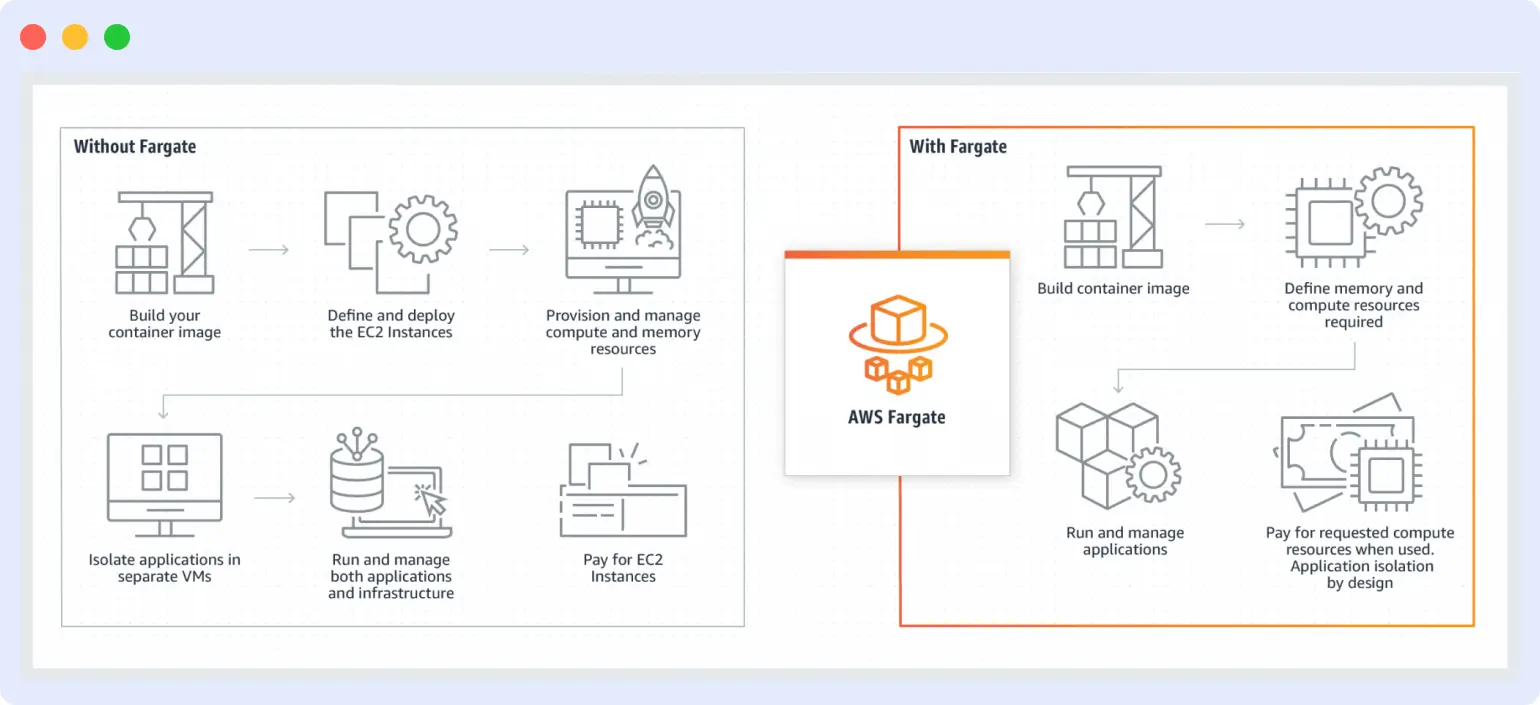
Because Fargate sits on top of ECS or EKS, teams already weighing ECS vs EKS as their orchestrator need to make that call too, since it changes how the Fargate tasks underneath are scheduled and managed day to day.
AWS Lambda architecture
You write your function in a language Lambda supports, package it, and upload it. You then wire it to a trigger, such as a new object landing in S3 or a new record appearing in a DynamoDB table.
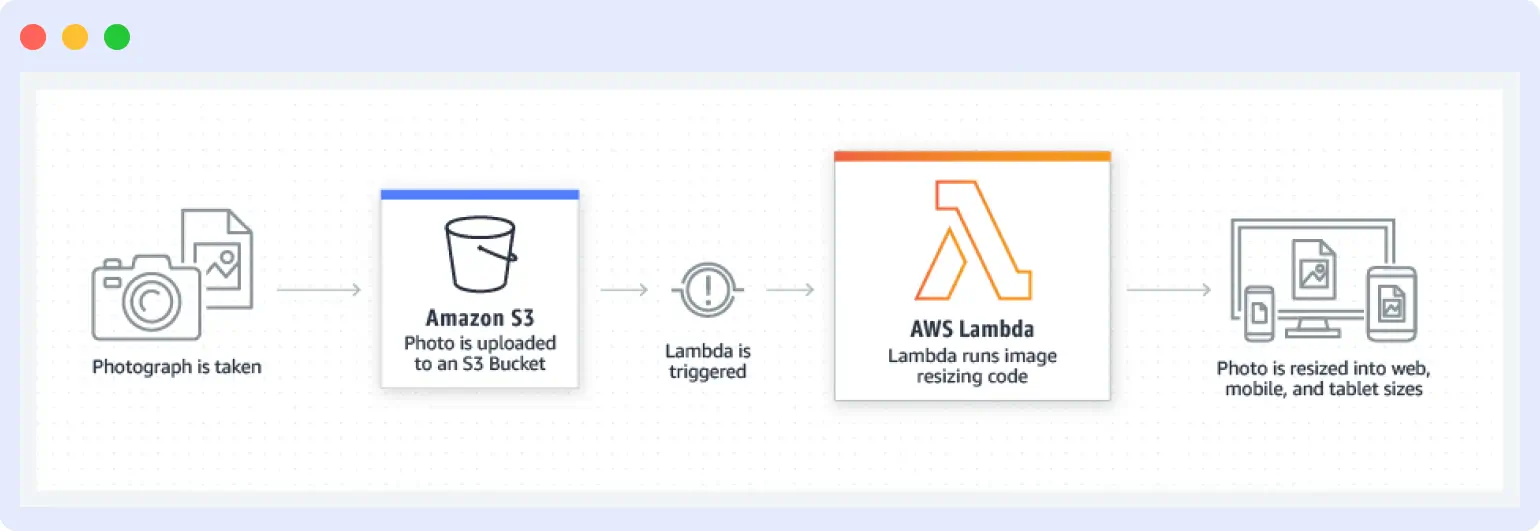
When the trigger fires, Lambda launches an instance of your function to handle that specific event. If another event arrives while the first is still running, Lambda starts a second instance rather than queuing behind the first, which is how it achieves near-instant horizontal scaling. AWS manages everything underneath: the operating system, capacity provisioning, patching, and logging.
Fargate vs Lambda: 6 key differences
| Dimension | AWS Fargate | AWS Lambda |
|---|---|---|
| Scalability | Scales by adding or removing tasks; AWS manages the underlying capacity | Scales per invocation, near-instantly, with no capacity planning needed |
| Performance | Consistent, since CPU, memory, and storage are isolated per task | Tied to the memory allocated per function; more memory means more CPU and network bandwidth |
| Cost model | Pay for the vCPU and memory a task reserves, regardless of utilization | Pay per request and per millisecond of execution time, with no charge when idle |
| Maintenance | No EC2 instances to patch, but you still build and maintain container images | No servers and no container images to maintain at all |
| Execution limits | Tasks can run indefinitely | Functions are capped at 15 minutes per invocation |
| Best-fit use cases | Long-running services, microservices, batch processing, machine learning workloads | Event-driven, short-lived work: file processing, data transformation, API backends |
1. Scalability
Both services scale automatically, but the mechanics differ.
Fargate scales by adding or removing whole tasks. When a service needs more capacity, AWS schedules additional tasks behind the existing service; when demand drops, it removes them. This is horizontal scaling at the task level, and it is fast, but it is not instant: a new task still needs to pull its container image and start up before it can serve traffic, which typically takes seconds rather than milliseconds.
Lambda scales per invocation rather than per task. Every incoming event can trigger its own function instance, so a spike of a thousand simultaneous events can, within account concurrency limits, spin up close to a thousand parallel executions almost immediately. There is no fleet to grow, because there was never a fixed fleet to begin with. The trade-off is that this scaling model has less room for warm-up: each new instance beyond your currently warm pool starts cold.
Verdict
Fargate is the only option once a workload runs past 15 minutes; Lambda handles everything under that ceiling well.
2. Performance
Fargate performance is a function of what you reserve. Because each task gets dedicated vCPU and memory with no sharing across tasks, a task performs the same way at 3 a.m. as it does during a traffic spike, as long as it is not exceeding its own reserved resources. This predictability is why latency-sensitive, steady-state services tend to do well on Fargate.
Lambda performance is tied directly to the memory setting on the function, since AWS allocates CPU and network bandwidth proportionally to memory. Doubling a function’s memory allocation roughly doubles its CPU share too, which means a function that is CPU-bound rather than memory-bound can often be sped up simply by increasing its memory setting, even if it never actually uses that much RAM.
The other performance variable unique to Lambda is the cold start: the delay incurred when a new execution environment has to initialize before running your code for the first time. Cold starts are typically a few hundred milliseconds for lightweight runtimes and can run longer for larger deployment packages or languages with heavier runtime initialization.
Verdict: Fargate wins on consistency for latency-sensitive workloads; Lambda wins on cost-efficient elasticity once cold starts are managed.
3. Cost
The cost difference is worth sitting with for a moment, since it is the one that pays off most to get right. Fargate charges for reserved vCPU and memory whether or not the task is doing anything at that moment, so an over-provisioned task racks up cost quietly in the background. Lambda flips that: you are never billed for idle time, but a function that runs constantly at high volume can end up costing more per unit of work than a right-sized Fargate task would.
A quick worked example makes the trade-off concrete. A Fargate task reserving 0.5 vCPU and 1 GB of memory, running continuously for a month, costs roughly the same whether it processes ten requests a day or ten thousand, because you are paying for the reservation, not the usage.
A Lambda function handling that same ten-thousand-a-day volume, at a few hundred milliseconds each, would likely cost less overall, since most of that traffic clears well within Lambda’s free tier and low-volume pricing tiers. Flip the ratio to a workload that runs near-continuously at high concurrency, and the math usually reverses: Lambda’s per-invocation charges start to add up past what an equivalent reserved Fargate task would cost for the same throughput.
Data transfer is a line item worth planning for with both models. Neither Fargate nor Lambda pricing includes the cost of moving data out to the internet, between availability zones, or through a NAT gateway, so it is easy to miss in the headline compute price.
A Lambda function that looks inexpensive on paper can still cost more than expected if it reads large payloads from S3 across regions, and the same applies to a Fargate task pulling from a database in a different availability zone. Worth planning for before committing to either model at scale.
Verdict: Lambda costs less at low or spiky volume; Fargate costs less at steady, high-utilization volume.
4. Maintenance and management
Fargate removes EC2 instances from your maintenance list, but it does not remove containers. You are still responsible for building, versioning, and patching your own container images, and for keeping task definitions current as your application changes. That is real ongoing work, just work that happens at the image layer instead of the server layer.
Lambda removes both layers. There are no servers and no container images to maintain, so the only artifact you own is the function code itself. AWS handles the runtime, the operating system, and the underlying capacity end to end.
The trade-off shows up in flexibility rather than maintenance: Lambda functions are more constrained in runtime, package size, and available compute than a Fargate task running your own container image.
Verdict: Lambda carries the lighter maintenance load; Fargate trades a bit more upkeep for more control over the runtime.
5. Execution limits
This is a detail most comparisons leave out, and it is often the one that actually settles the decision. Lambda functions have a clear ceiling of 15 minutes per invocation, so AWS ends the execution once that point is reached. Fargate tasks have no equivalent limit and can run for as long as the workload needs, whether that is minutes, hours, or indefinitely for a long-lived service.
In practice, this single detail settles the choice for entire categories of work before cost or performance even enter the conversation: long video transcoding jobs, large batch ETL runs, and any process with an unpredictable or open-ended duration all point to Fargate. Workloads that occasionally brush up against the 15-minute mark can often be restructured with AWS Step Functions to checkpoint and resume, keeping them on Lambda where that is otherwise the better fit.
Verdict: Fargate is the only option once a workload runs past 15 minutes; Lambda handles everything under that ceiling well.
6. Use cases
Fargate’s combination of unbounded runtime, dedicated resources, and container portability suits long-running microservices, batch processing pipelines, and machine learning workloads that need predictable, sustained compute. It is also the natural choice when migrating existing containerized applications to serverless without rewriting them as functions.
Lambda’s event-driven, per-invocation model suits real-time file processing, data transformation pipelines, IoT telemetry ingestion, and backend APIs for web and mobile clients, especially where traffic is bursty or where paying for idle compute would be wasteful. It also pairs naturally with AWS Step Functions for orchestrating multi-step workflows across several functions.
Verdict: Choose Fargate for long-running, steady services; choose Lambda for short, event-driven bursts.
Other factors that shape the decision
Cold starts, and how to avoid them
Fargate tasks stay warm for the life of the task, so cold starts are not part of the equation. Lambda gives you two direct ways to manage them. Provisioned concurrency keeps a set number of execution environments pre-initialized and ready, which removes cold-start latency for the traffic level you configure.
For Java functions specifically, Lambda SnapStart restores from a cached snapshot of an already-initialized environment instead of running startup code again, cutting cold starts that used to take several seconds down to near-instant.
Both are configuration choices, not rewrites, so a workload that outgrows its cold-start budget can usually solve it without leaving Lambda.
Compute architecture and pricing
Both services support Graviton (ARM64) processors alongside x86, and the price difference is worth claiming: Graviton pricing runs roughly 20% lower than equivalent x86 pricing on both Fargate and Lambda.
For workloads that do not depend on x86-specific binaries, switching architecture is one of the more straightforward cost wins available on either service.
Concurrency and VPC networking
Lambda’s default account concurrency limit is 1,000 simultaneous executions, which covers most workloads comfortably and can be raised by request for larger ones. Reserved concurrency guarantees a minimum share of that capacity to a specific function, while provisioned concurrency, covered above, keeps instances pre-warmed.
One networking detail worth planning for: Lambda functions placed inside a VPC, to reach a private database for example, take on extra elastic network interface setup time, which adds to cold-start latency beyond what a public function experiences. Fargate tasks sit inside a VPC by default with no equivalent penalty, since the network interface is already part of how every task launches.
How to choose between Fargate and Lambda
Four questions settle most of these decisions in practice.
- How long does the workload run? If it needs more than 15 minutes per unit of work, or runs continuously, Fargate is the only option between the two. Anything shorter and event-driven fits Lambda’s model naturally.
- What does the cost curve look like? High, steady utilization tends to favor Fargate’s reserved-capacity pricing. Spiky, unpredictable, or low-volume traffic tends to favor Lambda’s pay-per-invocation model.
- How is the team set up to scale? Fargate scales horizontally by adding task instances; Lambda scales by expanding per-invocation resources automatically. Teams that already think in terms of container replicas usually find Fargate’s model more familiar.
- What does your team already know? Fargate assumes container fluency: building images, writing task definitions, managing ECS or EKS. Lambda assumes comfort writing and deploying functions without touching infrastructure at all. Neither is harder, but they draw on different skill sets.
Most production AWS environments do not pick one and walk away from the other. It is common to run steady, long-lived services on Fargate while handling bursty, event-driven work, like resizing an uploaded image or processing a webhook, on Lambda.
If you are also weighing broader AWS observability decisions beyond this one comparison, our AWS monitoring best practices guide covers the wider picture.
A few concrete scenarios make the split easier to picture:
- A checkout API that needs to respond in under 200 milliseconds, all day, every day. Steady, predictable, latency-sensitive traffic like this usually runs better on Fargate, where the task is already warm and resources are not shared with anyone else.
- A nightly batch job that reprocesses a data warehouse and takes 40 minutes to finish. This exceeds Lambda’s 15-minute cap outright, which makes Fargate the only realistic option of the two.
- A webhook handler that receives a few hundred calls a day, with long idle stretches in between. Lambda’s pay-per-invocation model is the stronger fit here, matching cost directly to the traffic pattern instead of paying for a Fargate task to sit idle most of the day.
- A machine learning inference service that needs a GPU and predictable throughput. Long-running, resource-heavy, and consistent, which again points to Fargate over Lambda’s short-lived execution model.
Serverless observability gaps in Fargate and Lambda
Serverless takes a lot of undifferentiated infrastructure work off your plate, but knowing what your application is doing still matters just as much. Fargate and Lambda each call for their own kind of visibility.
Fargate tasks come and go as scaling events happen, so the useful signal is captured while a task is running rather than after it has already scaled down. Lambda functions are even shorter-lived: a cold start, a timeout, or a memory ceiling all leave a trace, as long as something is capturing it the moment it happens.
This is where Middleware is built specifically to help, and it is also where a lot of point tools cover only one side of the picture: a tool built for containers alone will not show a Lambda cold start, and a tool built for functions alone will not show a Fargate task’s resource pressure. Middleware brings both together in one place.
- Middleware’s container monitoring tracks Fargate task health, CPU and memory pressure, and restarts, whether the tasks sit behind ECS or EKS.
- Middleware’s serverless monitoring traces Lambda invocations end to end, surfacing cold starts, timeouts, and downstream latency in the same view as everything else.
- Distributed tracing connects a request as it moves from a Lambda function to a Fargate-hosted service and back, so a slow response is one investigation instead of two.
- AI-driven alerting adapts to each workload’s normal pattern instead of relying on a single static threshold across every task or function, which keeps alerts relevant as usage scales up or down.
- Middleware’s OpsAI goes a step further than alerting: it detects and diagnoses issues from APM traces and logs across both Fargate tasks and Lambda invocations, and for EKS-based Fargate deployments it can also auto-fix common issues like pod crashes and open a pull request with the fix. Internally, OpsAI now resolves more than 80% of Middleware’s own production issues automatically, only acting once confidence exceeds 95%, with human review before anything merges.
Setting up Middleware for Fargate on ECS
Middleware monitors ECS Fargate tasks with a sidecar pattern, since Fargate does not allow host-level agents. Add two extra container definitions to your existing task: a Middleware Agent container to collect and export telemetry, and a Fluent Bit container to route application logs to your Middleware account.
Both run alongside your primary application container inside the same task, so no separate infrastructure is needed and no EC2 access is required. The full task definition example, including the exact environment variables for MW_API_KEY and MW_TARGET, is in the Amazon ECS monitoring documentation. Once the sidecars are deployed, task and container-level views are available in the ECS Explorer.
If you are running Fargate under EKS instead of ECS, the setup is different since EKS Fargate has no DaemonSets and no node access at all. Middleware covers that path with a single Helm install that enables both log routing, through AWS’s built-in Fluent Bit integration, and metrics collection, through the ADOT Collector, with no additional infrastructure. The step-by-step walkthrough is in the EKS on Fargate monitoring guide.
Setting up Middleware for Lambda
Lambda instrumentation runs through Middleware’s Lambda layers rather than a sidecar, since functions have no persistent container to attach one to. In short: set your function’s log format to JSON in the Lambda console under Configuration, add the OpenTelemetry Collector layer along with the language-specific ADOT auto-instrumentation layer, and point OPENTELEMETRY_COLLECTOR_CONFIG_URI at a bundled collector.yaml that exports over OTLP/HTTP to your Middleware account.
Because Lambda can freeze a container immediately after returning a response, the collector needs a short flush delay, for example OTEL_BSP_SCHEDULE_DELAY=500, so spans are sent before the runtime freezes rather than dropped. T
he complete layer ARNs, per-language wrapper snippets, and networking notes for VPC-attached functions are in the AWS Lambda monitoring documentation.
Consider a request that starts at an API Gateway endpoint, triggers a Lambda function, and that function then calls a service running on a Fargate task. If the response is slow, the useful question is not “which service is slow,” it is “where in that chain did the time go.” Without correlated tracing, answering that means opening the Lambda console for invocation duration, then separately opening container metrics for the Fargate task, then trying to line up timestamps by hand.
With traces connected end to end, the same investigation is one view: the cold start, the network hop, and the downstream task all show up on a single timeline.
None of this requires picking Fargate or Lambda ahead of time and locking in a single monitoring approach. Because Middleware ingests OpenTelemetry-native data from both, teams that run a mixed environment, long-lived services on Fargate and bursty functions on Lambda, get one correlated picture instead of stitching two tools together.
Keep full visibility while you migrate
Teams moving workloads between Fargate and Lambda need one place to watch both, especially during the weeks the split changes. Middleware connects to both through 450+ integrations, with a 14-day free trial and unlimited ingestion to test the whole migration before committing.
FAQs
Can you use Fargate and Lambda together?
Yes. Many architectures run steady, long-lived services on Fargate and handle bursty, event-driven work on Lambda, often with Lambda functions triggering or reacting to events produced by Fargate-hosted services.
Which is cheaper, Fargate or Lambda?
It depends on the workload’s shape. Lambda is usually cheaper for low-volume, bursty, or idle-heavy workloads since there is no charge when nothing is running. Fargate tends to be cheaper for steady, high-utilization workloads, since Lambda’s per-invocation pricing can add up faster than a right-sized reserved task at consistent volume.
Does Fargate support Kubernetes?
Yes. Fargate works with Amazon EKS as well as ECS, letting you run Kubernetes pods without managing the EC2 nodes underneath them. This mode removes node-level access, so tooling that depends on node access, like certain eBPF-based agents, needs to be evaluated against that constraint first.
What happens if a Lambda function runs longer than 15 minutes?
AWS ends the invocation once it reaches the 15-minute limit, regardless of whether the work finished. If a workload can approach or exceed that ceiling, either break it into smaller chunks orchestrated with AWS Step Functions, or move it to Fargate, which has no equivalent time limit on task duration.