



Summary: A Kubernetes Deployment is a declarative API object in the apps/v1 group that manages the full lifecycle of a set of identical Pods, including creation, scaling, rolling updates, self-healing, and rollback. It does not run containers directly; instead, it owns a ReplicaSet, which owns the individual Pods. This three-layer hierarchy — Deployment → ReplicaSet → Pod — is the mechanism behind zero-downtime updates, instant rollbacks, and automatic failure recovery.
TL;DR
- A Kubernetes Deployment manages stateless workloads declaratively; a ReplicaSet and individual Pods are created automatically.
- Never use :latest as an image tag, skip resource limits, or omit a readinessProbe in production.
- The default update strategy is RollingUpdate; use Recreate only when two versions cannot run simultaneously.
- Blue-green and canary are patterns built with multiple Deployments, not native strategy types.
- A/B testing and shadow deployments require a traffic controller (Istio, NGINX Ingress, or Argo Rollouts).
- Roll back in seconds with kubectl rollout undo; the previous ReplicaSet already exists.
- Monitor kube_deployment_status_replicas_unavailable and container memory after every rollout.
- Middleware provides cluster-wide Deployment visibility with correlated metrics, logs, and traces.
Kubernetes has become the standard for deploying and managing containerized applications at scale, but knowing how they work in production is what prevents outages before they happen.
This guide covers how Kubernetes Deployments work, how to write and configure a production-ready manifest, how to choose the right deployment strategy, and how to diagnose and monitor failures before they impact your users.
For a broader look at managing Kubernetes in production, see Middleware’s Kubernetes monitoring guide.
What is a Kubernetes deployment?
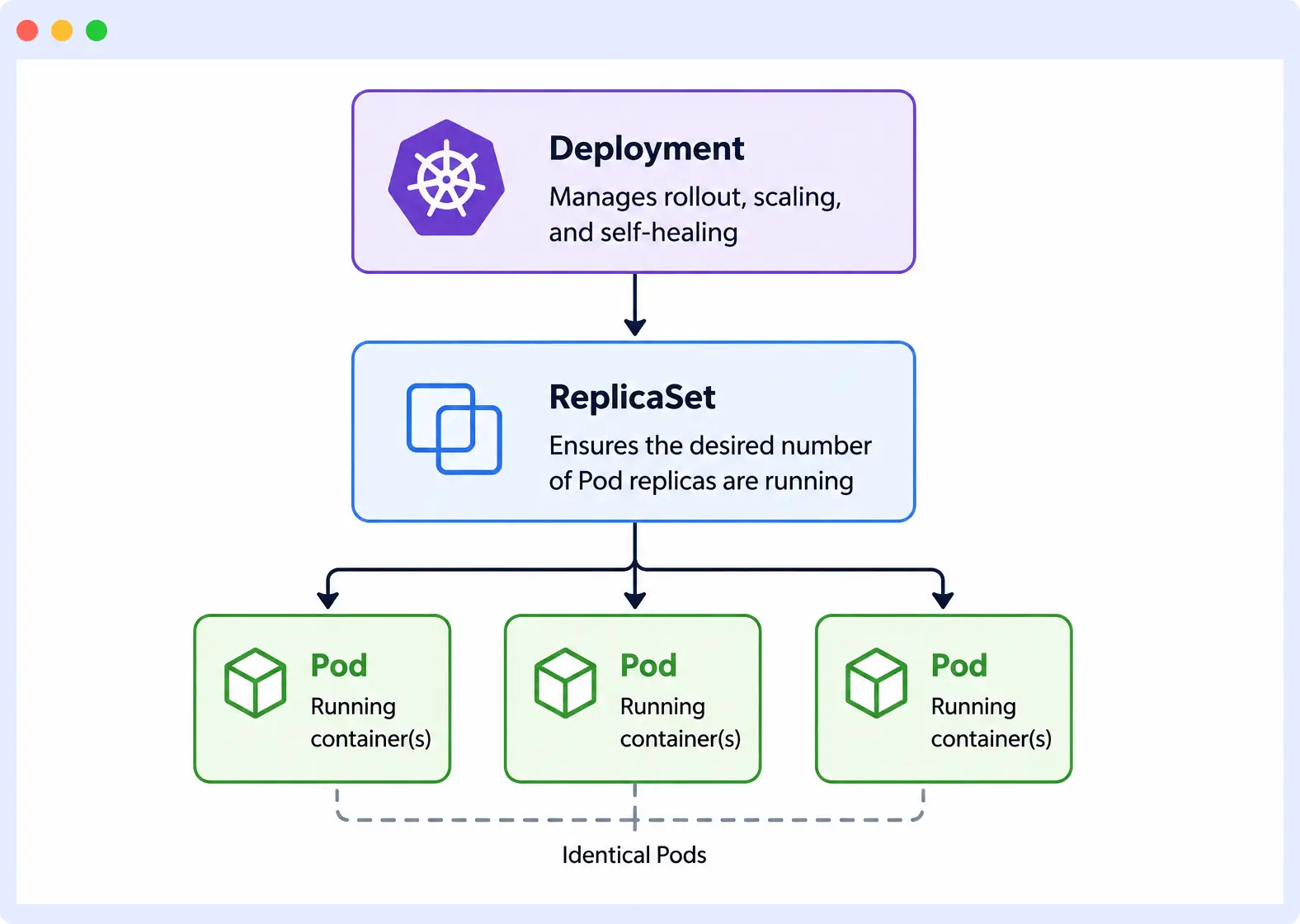
A Kubernetes Deployment is a declarative API object in the apps/v1 group that manages the lifecycle of a set of identical Pods, including creation, scaling, rolling updates, and self-healing by continuously reconciling actual cluster state against a user-defined desired state via the Deployment Controller.
A Deployment does not run containers directly. It creates and manages a ReplicaSet, which in turn creates and manages the individual Pods.
This three-layer hierarchy: Deployment → ReplicaSet → Pod is what enables rolling updates, rollbacks, and self-healing without manual intervention.
How a deployment differs from running Pods manually
A manually created Pod is an unmanaged object: when it crashes, is evicted, or its node fails, Kubernetes does not replace it. A Deployment-managed Pod is replaced automatically by the Deployment Controller within seconds of failure, because the reconciliation loop detects that the actual replica count has fallen below the desired count in spec.replicas.
Manual Pods have no update mechanism updating one requires deleting and recreating it, causing downtime. A Deployment updates Pods through a controlled rollout using either the RollingUpdate strategy, which replaces Pods incrementally, or the Recreate strategy, which terminates all Pods before starting new ones.
Manual Pods also have no rollback mechanism. A Deployment retains previous ReplicaSets up to the limit set by spec.revisionHistoryLimit (default: 10), enabling instant rollback without redeploying from scratch.
What problems does a poorly designed deployment create in production
Most Kubernetes outages are caused by Deployments that were never configured to handle real production conditions. These are the most common misconfigurations and what each one costs you in production.
- No resource limits: A Deployment without resource requests and limits allows a single Pod to consume all available CPU and memory on a node, starving co-located workloads and triggering cascading evictions across the cluster.
- Using
:latestas an image tag: A Deployment using the:latesttag can silently run stale container images because the image tag remains unchanged across releases. This makes application versions non-deterministic and difficult to audit during rollouts. - Missing or incorrect
readinessProbe: A Deployment without areadinessProbesends traffic to Pods that have started but are not yet ready to serve requests. An incorrectreadinessProbepath stalls a rolling update indefinitely, because Kubernetes waits for Pods to reach the Ready state before proceeding, and they never will.
The kubernetes objects a deployment depends on
A Kubernetes Deployment depends on a set of objects and infrastructure components responsible for the orchestration, scaling, and high availability of your application.
Control plane vs worker nodes: what each does during a Deployment
The control plane and worker nodes have distinct responsibilities during a Deployment, and a failure in either produces a different class of problem.
The control plane is the decision-making layer. It houses the API server, which receives and validates Deployment manifests; the scheduler, which assigns Pods to nodes based on available resources; and etcd, which stores the desired state of every object in the cluster.
The worker nodes are the execution layer. Each worker node runs a kubelet, which receives Pod specifications from the control plane and ensures the containers described in those specs are running. If a container crashes on a worker node, the kubelet detects the failure and restarts it before the Deployment Controller even needs to intervene.
Core objects: Pods, ReplicaSets, Deployments, Services
These four objects form the foundation of how Kubernetes runs and exposes applications. Each has a distinct responsibility, and none are interchangeable.
- Pod: The smallest deployable unit in Kubernetes. It wraps one or more containers that share the same network namespace and storage, and represents a single instance of a running process in the cluster.
- ReplicaSet: A controller object that ensures a specified number of identical Pod replicas are running at any given time. It creates new Pods when the actual count falls below the desired count and deletes Pods when it exceeds it.
- Deployment: A declarative API object in the
apps/v1group that manages the lifecycle of a ReplicaSet, including creation, scaling, rolling updates, and rollback, by continuously reconciling actual cluster state against a user-defined desired state via the Deployment Controller. - Service: A stable network endpoint that exposes a set of Pods under a single IP address and DNS name. Because Pod IPs change every time a Pod is recreated, a Service gives other applications a consistent way to reach your Deployment.
Kubernetes deployment vs statefulset vs daemonSet: when to use each
Deployment, StatefulSet, and DaemonSet are all controller objects, but they are built for different workload types. Using the wrong one for your workload creates problems that no amount of configuration will fix.
- Deployment: A Deployment manages stateless workloads where every Pod is identical and interchangeable. It is the correct choice for web servers, APIs, and any application that does not need to retain data or maintain a stable network identity between restarts.
- StatefulSet: A StatefulSet manages stateful workloads where each Pod requires a stable network identity, a persistent storage volume, and a guaranteed startup and shutdown order. It is the correct choice for databases, message queues, and distributed systems such as Elasticsearch and Kafka.
- DaemonSet: A DaemonSet ensures that exactly one Pod runs on every node in the cluster, or a subset of nodes matching a selector. It is the correct choice for node-level infrastructure concerns like log collection, metrics agents, and network plugins.
| Features | Deployment | StatefulSet | DaemonSet |
| Workload type | Stateless | Stateful | Node-level |
| Pod identity | Interchangeable | Stable, ordered | One per node |
| Storage | Ephemeral | Persistent | Ephemeral |
| Use case | APIs, web servers | Databases, message queues | Log collectors, metrics agents |
Writing a kubernetes deployment manifest
A Deployment manifest is a YAML file that declares the desired state of your application. Every field you define is an instruction to the Deployment Controller, and every field you leave out defaults to a value that may not suit your workload.
YAML Structure: apiVersion, kind, metadata, spec
A Deployment manifest has four top-level fields that every Kubernetes object shares.
# Minimal Kubernetes Deployment manifest
apiVersion: apps/v1        # API group that owns the Deployment object
kind: Deployment           # Resource type being defined
metadata:
  name: my-app             # Unique name for this Deployment within the namespace
  namespace: production    # Namespace this Deployment belongs to
spec: # Desired state of the DeploymentapiVersionidentifies the API group that owns the object. Deployments live inapps/v1.kindtells Kubernetes what type of object you are defining.metadataholds the name and namespace that identify the Deployment within the cluster.specThis is where the desired state lives: replica count, Pod template, and update strategy.
Key Fields: replicas, selector, template, containers
These four fields inside spec control what your Deployment runs and how many instances of it exist.
spec:
  replicas: 3                          # Number of identical Pod copies to maintain
  selector:
    matchLabels:
      app: my-app                      # Must match labels defined in template.metadata.labels
  template:
    metadata:
      labels:
        app: my-app                    # Label that ties Pods back to this Deployment
    spec:
      containers:
        - name: my-app
          image: my-app:1.0.0          # Never use :latest in production
          ports:
            - containerPort: 8080
          resources:
            requests:
              cpu: "250m"
              memory: "128Mi"
            limits:
              cpu: "500m"              # Prevents a single Pod from consuming all node CPU
memory: "256Mi" # Prevents a single Pod from consuming all node memory- replicas: Sets the number of Pod copies the Deployment Controller maintains at all times.
- selector: Tells the controller which Pods belong to this Deployment by matching labels.
- template: Defines the Pod specification the ReplicaSet uses to create each Pod.
- containers: Where you define the image, ports, and resource limits for each container in the Pod.
Choosing the right strategy field in your manifest
The strategy field controls how Kubernetes replaces Pods during an update. It defaults to RollingUpdate if left undefined.
spec:
  strategy:
    type: RollingUpdate
    rollingUpdate:
      maxUnavailable: 1    # Maximum number of Pods that can be unavailable during the update
maxSurge: 1 # Maximum number of extra Pods that can exist during the update- RollingUpdate: Replaces Pods incrementally, keeping the application available throughout the update.
- Recreate: Terminates all existing Pods before creating new ones, causing downtime but ensuring no two versions run simultaneously. Use Recreate only when your application cannot handle two versions running at the same time, such as when a database schema change is not backward compatible.
What happens during a Deployment update
A rollout starts when a change is made to spec.template — the part of the manifest that defines the Pod. Changing the container image, environment variables, or resource limits all trigger a new rollout. Changing spec.replicas does not trigger a rollout because it does not modify the Pod template.
When a rollout starts, the Deployment Controller creates a new ReplicaSet with the updated Pod template and begins scaling it up while scaling the old ReplicaSet down. Readiness probes control how fast the transition happens the controller will not scale down the old ReplicaSet until new Pods pass their readiness probe and reach Ready state.
If a rollout stalls or produces a bad release, kubectl rollout undo reverts the Deployment to the previous revision by scaling the old ReplicaSet back up and scaling the new one down to zero. This is near-instant because the old ReplicaSet already exists. The number of ReplicaSets Kubernetes retains is controlled by spec.revisionHistoryLimit, which defaults to 10. Setting it to zero disables rollback entirely.
To diagnose a failed rollout, three commands cover most failure cases:
kubectl rollout status deployment/my-app— shows whether the rollout is progressing or stalled.kubectl describe deployment my-app— surfaces misconfigured fields and controller error messages.kubectl get pods— reveals individual Pod failure states such asCrashLoopBackOfforImagePullBackOff.
Kubernetes deployment strategies
Kubernetes provides two native update strategies RollingUpdate and Recreate. Blue-green, canary, A/B testing, and shadow deployments are not native strategy types. They are architectural patterns implemented using multiple Deployments, Service configurations, and in some cases, a traffic controller like Istio or Argo Rollouts.
Rolling update: the default Kubernetes deployment strategy
A rolling update replaces Pods incrementally, ensuring the application remains available throughout the update. It is the default strategy and the right choice for most stateless workloads.
maxUnavailable sets the maximum number of Pods that can be offline during the update. It defaults to 25% of the desired replica count.
maxSurge sets the maximum number of extra Pods that can exist above the desired replica count during the update. It also defaults to 25%.
spec:
  strategy:
    type: RollingUpdate
    rollingUpdate:
      maxUnavailable: 1    # At most 1 Pod offline at any point during the update
      maxSurge: 1          # At most 1 extra Pod running above desired replica count
Setting maxUnavailable: 0 ensures zero downtime by requiring new Pods to be ready before old ones are terminated.
Recreate: full restart with downtime
The Recreate strategy terminates all existing Pods before creating new ones, resulting in downtime during the update. It is the correct choice when your application cannot run two versions simultaneously, for example, when a database schema change is not backward compatible.
# Recreate strategy — terminates all Pods before starting new
spec:
  strategy:
    type: Recreate
Blue-green deployment in Kubernetes
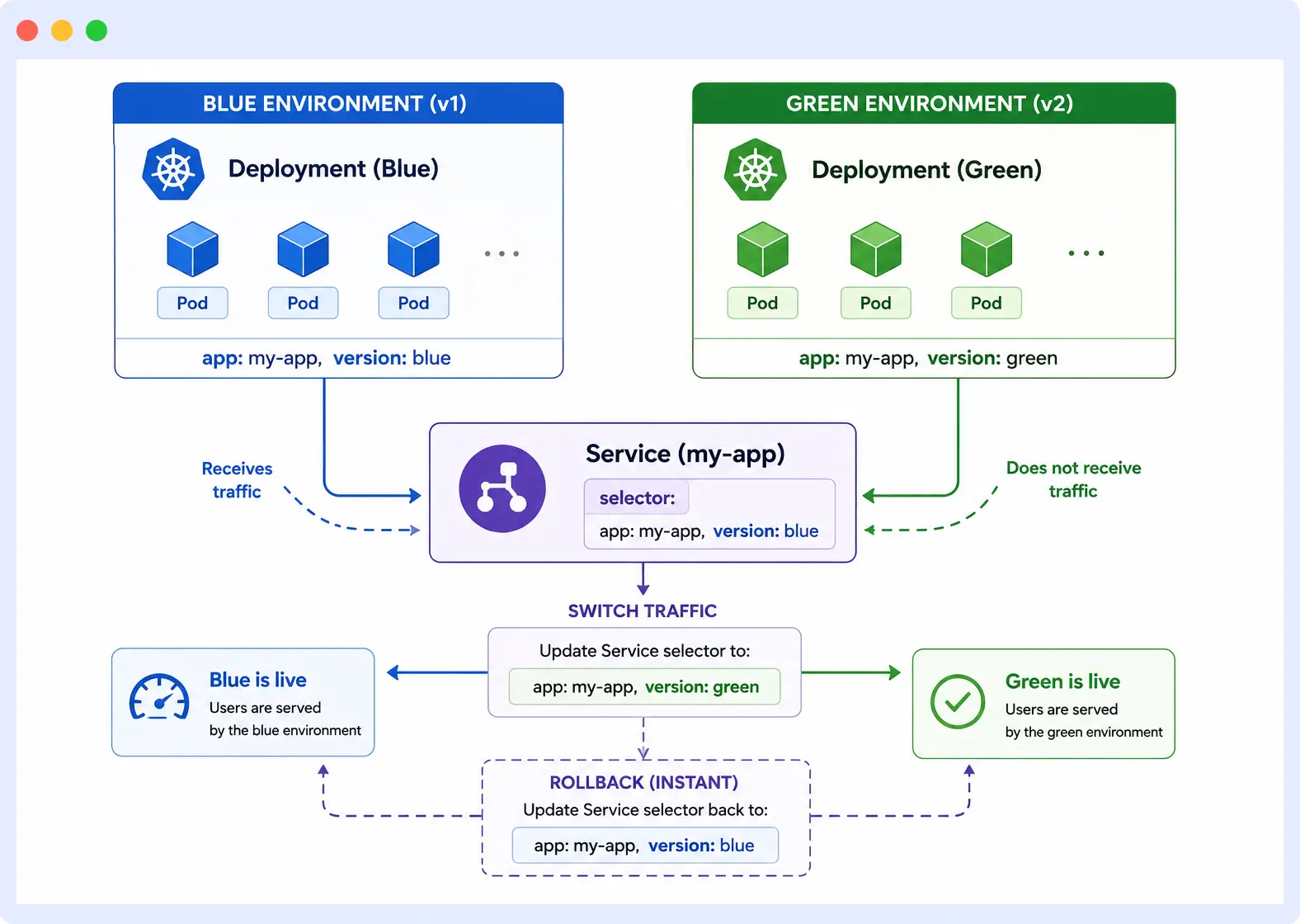
A blue-green deployment runs two identical environments simultaneously: blue serves live traffic while green runs the new version. Traffic is switched from blue to green by updating the Service selector, making the cutover instant and the rollback equally instant.
# Green Deployment — new version running alongside blue
apiVersion: apps/v1
kind: Deployment
metadata:
  name: my-app-green
spec:
  replicas: 3
  selector:
    matchLabels:
      app: my-app
      version: green
  template:
    metadata:
      labels:
        app: my-app
        version: green
    spec:
      containers:
        - name: my-app
          image: my-app:2.0.0
---
# Service selector switch — moves traffic from blue to green
apiVersion: v1
kind: Service
metadata:
  name: my-app
spec:
  selector:
    app: my-app
    version: green           # Change from "blue" to "green" to switch live traffic
Switching traffic requires updating only the version label in the Service selector. Rolling back requires switching it back to blue. Both operations are instant because both Deployments are already running.
Trade-off: Blue-green requires double the infrastructure capacity during the cutover window.
Canary releases in Kubernetes
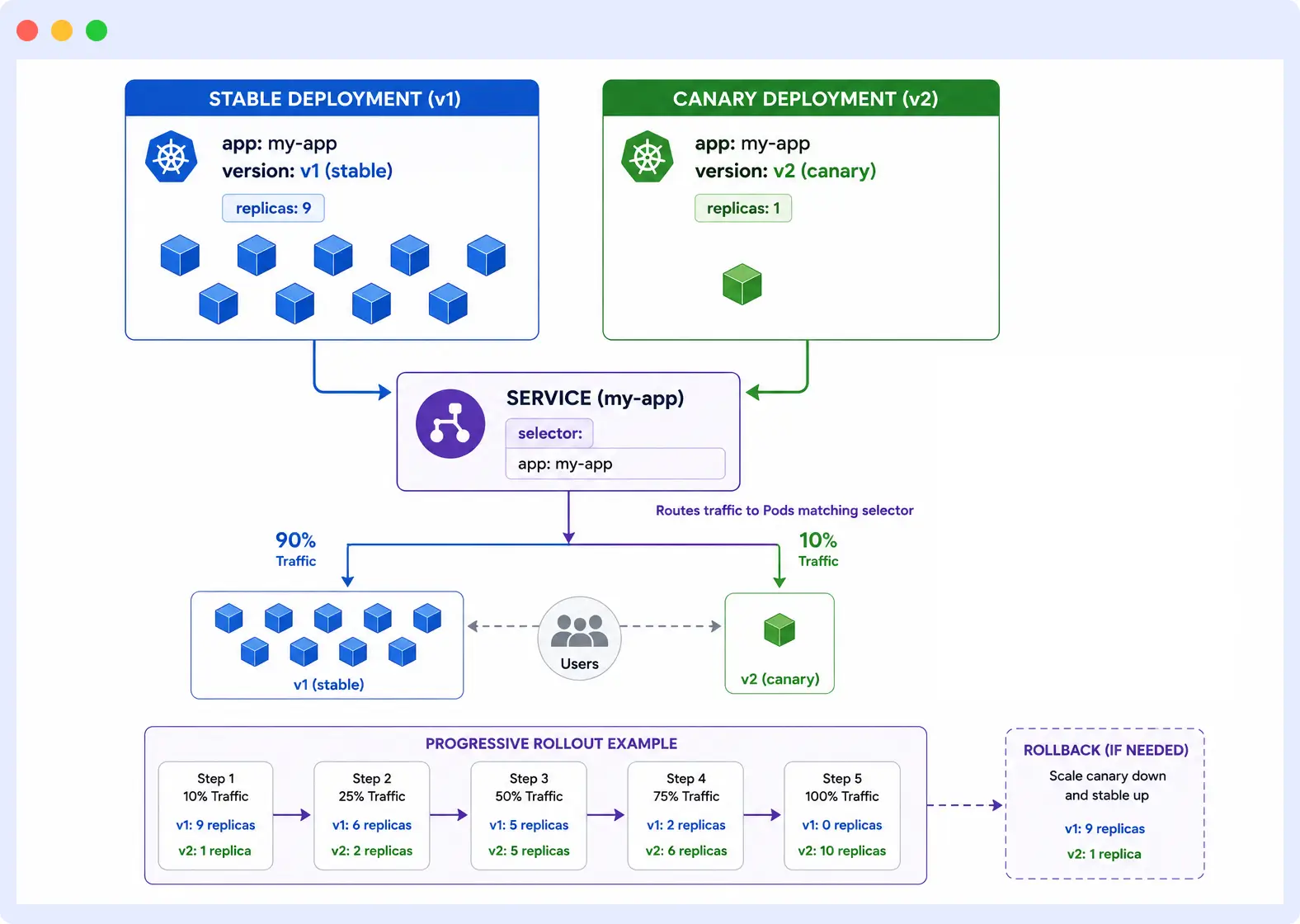
A canary release routes a small percentage of live traffic to a new version before rolling it out fully. It is used to validate a new release against real traffic without exposing all users to it.
Native canary in Kubernetes is implemented by running two Deployments simultaneously and controlling the traffic split via replica ratios. A stable Deployment runs 9 replicas, and a canary Deployment runs 1, resulting in approximately 10% of traffic reaching the canary.
# Canary Deployment — new version receiving ~10% of live traffic
apiVersion: apps/v1
kind: Deployment
metadata:
  name: my-app-canary
spec:
  replicas: 1                # 1 canary replica out of 10 total = ~10% of traffic
  selector:
    matchLabels:
      app: my-app            # Same label as stable Deployment — Service routes to both
  template:
    metadata:
      labels:
        app: my-app
    spec:
      containers:
        - name: my-app
          image: my-app:2.0.0
Native canary via replica ratio is imprecise because traffic distribution is based on Pod count, not request count. For precise traffic splitting, header-based routing, or gradual percentage rollouts, tools like Argo Rollouts or Istio are required.
A/B testing deployments
A/B testing routes specific user segments to different versions of an application — for example, routing users in a specific region or with a specific cookie to version B, while all other users receive version A. Unlike canary, which is a safety mechanism for gradual rollout, A/B testing is a feature validation mechanism driven by user attributes.
A/B testing is not achievable with native Kubernetes alone because Pod selection is random. It requires a traffic controller that can make routing decisions based on request headers, cookies, or user identity. Istio’s VirtualService with header-match rules is the most common implementation. NGINX Ingress with annotation-based routing is a lighter alternative for clusters without a service mesh.
Shadow deployments
A shadow deployment mirrors a copy of live production traffic to a new version of the application without exposing the new version’s responses to real users. The new version processes requests in parallel but its responses are discarded. This makes it possible to test a new version under realistic production load without any user-visible risk.
Shadow deployments require traffic mirroring at the proxy layer. Istio supports traffic mirroring natively via the mirror field in a VirtualService. NGINX and Envoy also support request mirroring. Pure Kubernetes without a service mesh cannot mirror traffic.
Use shadow deployments when: you need to validate performance, correctness, or database query behavior under real production load before promoting a release to any percentage of users.
Choosing the right deployment strategy
| Strategy | Downtime | Rollback speed | Traffic control | Best for |
|---|---|---|---|---|
| Rolling update | None | Fast | None needed | Most stateless workloads |
| Recreate | Yes | Fast | None needed | Incompatible schema changes |
| Blue-green | None | Instant | Service selector | High-stakes releases, instant cutover |
| Canary | None | Fast | Replica ratio / mesh | Gradual rollout with safety gate |
| A/B testing | None | Fast | Header/cookie routing | Feature experiments on user segments |
| Shadow | None | N/A | Traffic mirroring | Load testing without user risk |
Get full visibility into your Kubernetes Deployments
Middleware surfaces Deployment failures, pod crashes, and OOMKilled events in real time with correlated metrics, logs, and traces in a single dashboard. Start monitoring for free
Common kubernetes deployment failures
Most Kubernetes Deployment failures produce a visible error state on the Pod. Knowing what each state means cuts diagnosis time significantly.
ImagePullBackOff
Occurs when Kubernetes cannot pull the container image specified in the manifest. The most common causes are an incorrect image name or tag, a private registry with no imagePullSecret configured, or network connectivity issues between the node and the registry.
kubectl describe pod <pod-name> # Shows the exact pull error messageCrashLoopBackOff
Occurs when a container starts, crashes, and Kubernetes keeps restarting it. The container is reachable but the application inside it is failing. Reading the logs from the last crashed container before Kubernetes overwrites them is the fastest path to the failure cause.
kubectl logs <pod-name> --previous # Logs from the last crashed containerPods stuck in Pending
Means the scheduler cannot find a node that satisfies the Pod’s requirements. The two most common causes are insufficient cluster resources to meet the Pod’s resource requests, and a node selector or affinity rule that no available node matches.
kubectl describe pod <pod-name> # Look for "Insufficient cpu" or "no nodes available" eventsDeployment rollout stalled
Occurs when new Pods never reach Ready state, causing the Deployment Controller to pause the rollout without scaling down the old ReplicaSet. The most common cause is a misconfigured readinessProbe path that the application never responds to successfully.
kubectl rollout status deployment/my-app # Shows "Waiting for deployment rollout to finish"Deployment not updating
Occurs when a Deployment is applied with a new configuration but the running Pods do not change. The most common cause is using :latest as the image tag. Kubernetes evaluates tag changes, not image digest changes, when deciding whether to update a Pod.
OOMKilled
Occurs when a container exceeds its memory limit and Kubernetes terminates it. The Pod restarts but will be OOMKilled again if the memory limit is not increased or the application memory usage is not reduced. Memory limits should be set to accommodate peak usage, not average usage. See our guide on diagnosing Kubernetes OOMKilled errors for a full walkthrough.
If any of these failures occur after a rollout, reverting to the previous revision is near-instant because the previous ReplicaSet already exists and only needs to be scaled back up: kubectl rollout undo deployment/my-app
OOMKilled containers typically exit with Exit Code 137 — see our dedicated guide for full diagnosis steps.
Monitoring Kubernetes deployments after rollout
A successful rollout does not mean a healthy Deployment. Misconfigured applications, resource constraints, and probe failures surface under real traffic, not during the rollout itself.
Middleware’s container monitoring tracks Pod-level health across your entire cluster.
Immediate post-rollout checks
- Verify that all Pods are in
Runningstate and none are inCrashLoopBackOfforPending. - Check application logs for errors that Kubernetes cannot detect on its own.
- Confirm the new ReplicaSet is fully scaled up and the old one is at zero replicas.
Key Prometheus metrics to watch
kube_deployment_status_replicas_unavailabletracks Pods not yet available; any value above zero after a completed rollout warrants investigation.container_memory_working_set_bytestracks memory usage against configured limits; a value approaching the limit predicts an OOMKilled event.kube_pod_container_status_restarts_totalA spike in restart count after rollout is an early indicator ofCrashLoopBackOff.
For a full list of tools to track these metrics, see Kubernetes monitoring tools.
Log aggregation
Pod logs disappear when a Pod is terminated. A tool like Fluentd or Loki retains logs across restarts and makes them queryable by Deployment name and time range. Middleware’s Kubernetes log monitoring correlates pod logs with infrastructure metrics so you can move from a log error to a root cause without switching tools.
Alert conditions
- Unavailable replicas persist beyond five minutes after a completed rollout.
- Pod restart count spikes within a short window (e.g., more than three restarts in ten minutes).
- Container memory usage exceeds 80% of its configured limit.
- Rollout duration exceeds your defined
progressDeadlineSecondsthreshold.
Automated root cause analysis with OpsAI
Manual alert triage slows down incident response. Middleware’s OpsAI, an AI SRE agent, automatically analyzes Kubernetes failures, identifies root cause across metrics, logs, and traces, and surfaces actionable remediation steps. In internal testing, OpsAI auto-resolved over 50% of Kubernetes incidents without human intervention and reduced on-call response time by over 80%.
Best practices for kubernetes deployments
Namespace isolation and RBAC
Deploy applications into dedicated namespaces rather than the default namespace, and restrict which users and service accounts can modify Deployments within each namespace. A misconfigured Deployment in a shared namespace can affect every other workload running in it.
Horizontal Pod Autoscaler
The Horizontal Pod Autoscaler (HPA) automatically scales the replica count of a Deployment based on CPU usage, memory usage, or custom metrics. It requires resource requests to be defined in the manifest because it calculates utilization as a percentage of the requested amount. Without resource requests, the HPA cannot function.
Middleware’s infrastructure monitoring surfaces HPA scaling events alongside node-level resource metrics.
Pod Disruption Budgets
A Pod Disruption Budget (PDB) defines the minimum number of Pods that must remain available during a voluntary disruption, such as a node drain or cluster upgrade. Without one, Kubernetes may terminate enough Pods simultaneously to take a Deployment below its minimum availability threshold.
apiVersion: policy/v1
kind: PodDisruptionBudget
metadata:
  name: my-app-pdb
spec:
  minAvailable: 2          # At least 2 Pods must remain available at all times
  selector:
    matchLabels:
      app: my-app
Liveness probes alongside readiness probes
A readinessProbe controls whether a Pod receives traffic. A livenessProbe controls whether Kubernetes restarts a Pod that has entered an unhealthy state but has not crashed. Both should be defined in production. A common pattern is a readiness probe that checks application-level health (e.g., a database connection) and a liveness probe that checks only basic process health (e.g., an HTTP 200 from an /healthz endpoint).
containers:
  - name: my-app
    image: my-app:1.0.0
    readinessProbe:
      httpGet:
        path: /ready
        port: 8080
      initialDelaySeconds: 10
      periodSeconds: 5
    livenessProbe:
      httpGet:
        path: /healthz
        port: 8080
      initialDelaySeconds: 15
      periodSeconds: 10
GitOps and CI/CD
Manage Deployment manifests in version control and apply them through an automated pipeline rather than manually. Tools like ArgoCD and Flux sync cluster state to the desired state defined in a Git repository, making every change auditable and reversible. Manual changes made outside the pipeline create drift between what is in Git and what is running in the cluster.
Set progressDeadlineSeconds explicitly
progressDeadlineSeconds defines how long the Deployment Controller waits before marking a rollout as failed. It defaults to 600 seconds (10 minutes). Setting it to a value aligned with your SLA, for example, 180 seconds, ensures stalled rollouts fail fast rather than silently blocking the cluster for ten minutes.
spec:
  progressDeadlineSeconds: 180    # Mark rollout failed if no progress within 3 minutes
Complete Kubernetes deployment visibility with Middleware
Configuring Deployments correctly is only half the work. Knowing what is happening inside your cluster after a rollout is the other half, and that is where most teams lose visibility.
Middleware automatically surfaces Deployment failures and alerts you before they impact your users. Beyond failure detection, Middleware gives you cluster-wide visibility into your Deployments, ReplicaSets, nodes, and Pods from a single dashboard, with correlated metrics, logs, and traces, so you have the context you need to troubleshoot fast, not just the signal that something went wrong.
OpsAI, Middleware’s AI SRE agent, goes further by automatically running root cause analysis on Kubernetes failures, correlating signals across your entire stack, and recommending or executing remediation steps without requiring manual triage.
Start monitoring your Kubernetes Deployments with Middleware. Full-stack observability, AI-powered root cause analysis, and Kubernetes-native dashboards. Set up in minutes. See how Middleware monitors Kubernetes
FAQs
What is a Kubernetes Deployment?
A Kubernetes Deployment is a declarative API object in the apps/v1 group that manages the lifecycle of a set of identical Pods, including creation, scaling, rolling updates, and self-healing. It does not run containers directly — it creates and manages a ReplicaSet, which in turn creates and manages the individual Pods.
What is the difference between a Kubernetes Deployment and a Pod?
A Pod is the smallest deployable unit in Kubernetes, representing a single running instance of your application. A Deployment is a controller object that manages a set of identical Pods, ensuring they stay running, scale correctly, and update safely. A manually created Pod that crashes is not replaced; a Deployment-managed Pod is recreated automatically by the Deployment Controller within seconds of failure.
What is a Kubernetes Deployment YAML and what does it contain?
A Kubernetes Deployment YAML is a manifest file that declares the desired state of your application to the Deployment Controller. It contains four top-level fields: apiVersion, kind, metadata, and spec, where spec defines replica count, container image, resource limits, and update strategy. A Deployment YAML without resource limits and a defined update strategy is incomplete for production use.
How do I create a Deployment in Kubernetes?
A Kubernetes Deployment is created by applying a YAML manifest using kubectl apply -f deployment.yaml. The API server validates the manifest, stores the desired state in etcd, and the Deployment Controller creates a ReplicaSet, which creates the specified number of Pods. A Deployment is not production-ready until resource limits, a readiness probe, and an explicit update strategy are defined in the manifest.
What is the default Kubernetes Deployment strategy?
The default Kubernetes Deployment strategy is RollingUpdate, which replaces Pods incrementally during an update while keeping the application available. It defaults to maxUnavailable: 25% and maxSurge: 25% when no strategy is explicitly defined. The only other native strategy is Recreate, which terminates all Pods before starting new ones and causes downtime.
What is a rolling update in Kubernetes and how does it work?
A rolling update is triggered by any change to spec.template and replaces Pods incrementally by scaling a new ReplicaSet up while scaling the old one down. The transition rate is controlled by maxUnavailable and maxSurge, and no Pod is retired until its replacement passes the readiness probe. Changing spec.replicas does not trigger a rolling update because it does not modify the Pod template.
How do I roll back a Kubernetes Deployment?
Rolling back a Kubernetes Deployment reverts it to a previous revision by running kubectl rollout undo deployment/my-app. The rollback scales the previous ReplicaSet back up and scales the current one down to zero. It is near-instant because the previous ReplicaSet already exists in the cluster. The number of revisions retained is controlled by spec.revisionHistoryLimit, which defaults to 10.
What is the difference between blue-green and canary deployments in Kubernetes?
A blue-green deployment switches all traffic from one environment to another in a single instant cutover. A canary deployment routes only a small percentage of traffic to the new version, gradually increasing it as confidence grows. Blue-green is faster to execute and roll back, but requires double the infrastructure capacity. Canary reduces blast radius but requires more careful traffic control and monitoring over a longer rollout window.
What is a shadow deployment in Kubernetes?
A shadow deployment mirrors a copy of live production traffic to a new version of an application without exposing the new version’s responses to real users. It is used to test a new version under realistic production load before promoting it to any users. Shadow deployments require traffic mirroring support at the proxy layer — Istio’s VirtualService mirror field is the most common implementation in Kubernetes.
Browse all Kubernetes guides on Middleware →

