Most teams waste hours daily on repetitive tasks. DevOps engineers repeatedly fix the same issues. Site reliability teams manually restart failing services. Platform engineers spend nights investigating alerts. These tasks steal time from actual work.
AI agents offer a practical solution. Think of them as digital assistants that understand your needs, make wise choices, and work independently. Teams aiming to scale without hiring more people need them.
According to Gartner, by 2028, over 33% of enterprise applications will include agentic AI. Modern systems generate massive volumes of logs, metrics, and alerts that humans can’t analyze manually without missing issues.
AI agents help by continuously observing systems, reasoning over telemetry, and taking action in real time. Unlike scripts or static workflows, they operate with context and intent, helping teams improve reliability and scale operations without increasing on-call burden.
This guide shows if AI agents are right for you and how to evaluate solutions that fit your actual needs.
What Are AI Agents?
An AI agent is software that can execute tasks independently. Rather than waiting for your instructions at each stage, it determines what needs to be done and completes it on its own.
Key Characteristics of AI Agents
AI agents differ from traditional software because they are designed to operate independently in dynamic environments.
A true AI agent typically includes the following capabilities:
- Autonomy – It performs tasks without continuous human input.
- Context awareness – It understands system state, historical behavior, and recent changes.
- Decision-making – It evaluates multiple options before acting.
- Tool usage – It can interact with APIs, cloud platforms, CI/CD systems, and repositories.
- Learning – It improves over time based on outcomes and feedback.
These capabilities allow agents to handle complex workflows that would normally require human judgment at every step.
For instance, if a DevOps agent detects a failed release, they can roll it back, notify the team, and try again with a safer configuration, all without manually checking logs.
These features are becoming more common because LLMs have gotten better, it’s cheaper to run things in the cloud now, and there are actually decent tools for building automated workflows. As a result, AI agents are emerging as a practical solution for modern operations teams.
Scripts vs. Chatbots vs AI Agents
People often confuse these three, but they operate very differently. Here’s the simplest way to see the difference:
- Scripts – follow fixed instructions
A script always follows the same rules. You can write a script to notify a user that their trial is ending.
If the data type is correct, an email will be sent. But it won’t work with changed code or missing data. Scripts don’t choose; they follow instructions.
- Chatbots – answer questions but don’t act
Chatbots can answer questions but not do tasks.
Asking an API documentation chatbot, “How do I authenticate?” It’ll either reply with the steps or send links to documentation. But it cannot investigate if you’re having an error or help you fix anything.
Chatbots help with information, not action.
- AI Agents – understand the situation and take action
Agents observe what’s happening, decide what to do, and execute steps independently.
Example: If your backend service starts failing in production, what an AI agent will do is:
- Detects the failing service
- Analyzes logs and recent deployments
- Identifies the likely root cause
- Automatically restarts the service to solve the problem.
It adapts, reasons, and completes the task end-to-end.
The core difference comes down to ownership.
Scripts own rules.
Chatbots own answers.
AI agents own outcomes.
That’s what makes agents suitable for real operational environments where conditions constantly change.
How Do AI Agents Work?
AI agents follow a four-step process that mirrors how people approach tasks. The steps describe what happens behind the scenes.
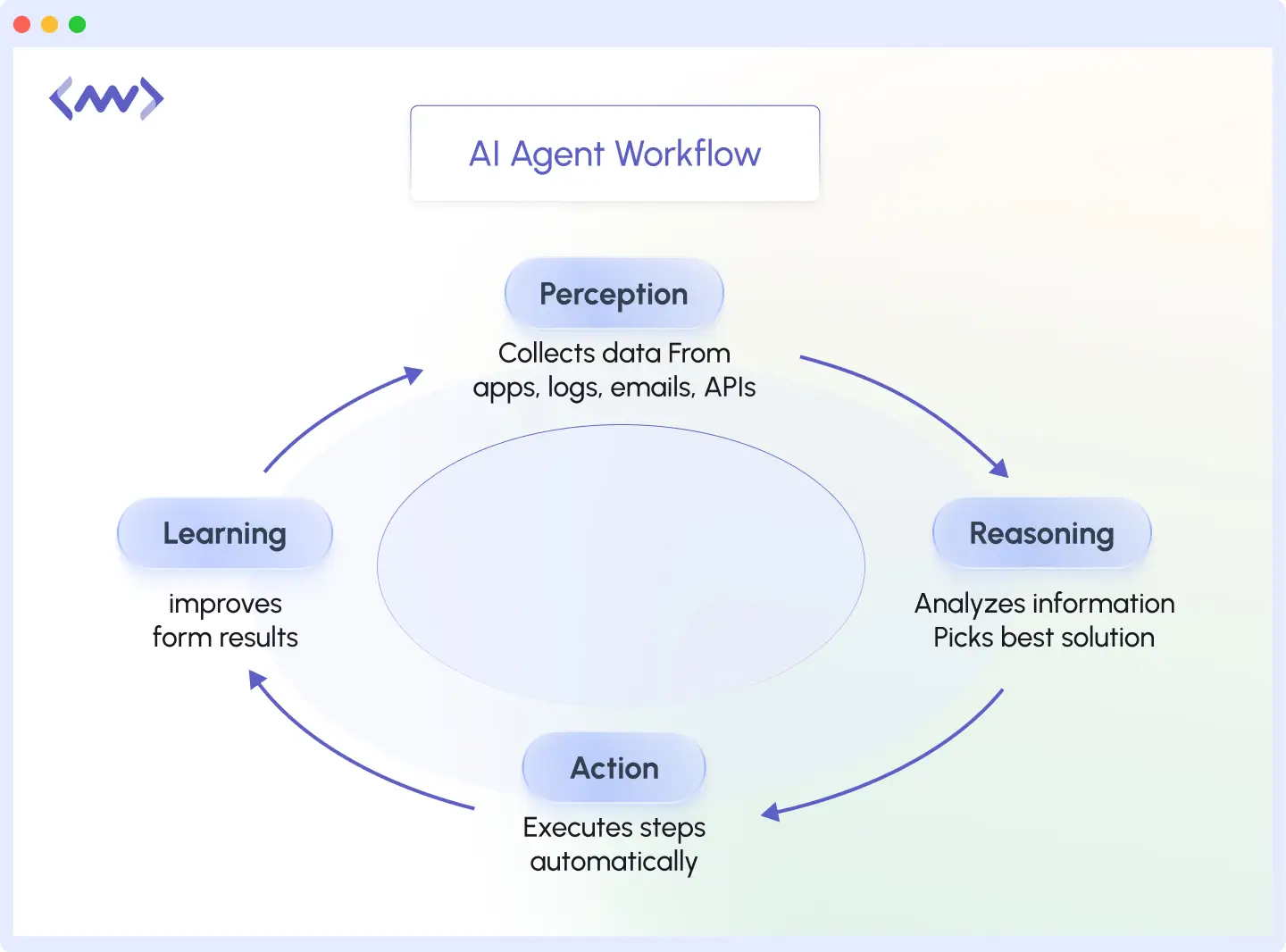
- Perception (notice what’s happening): An agent can monitor your production API, for instance, and notice response times climbing from 200ms to 3 seconds. It’ll gather logs, database query times, and server metrics.
- Reasoning (decide what to do): It analyzes the data and determines what happens. Let’s say that a recent deployment added a database query that isn’t optimized and scans millions of rows without an index.
- Action (do the work): It’ll solve the problem by creating a database index on the queried column, restarting the affected service pods, and verifying that response times return to normal.
- Learning (improving from feedback): It’ll continuously learn from feedback, and next time it sees similar query patterns, it’ll flag them during code review before deployment.
This cycle repeats constantly. After completing a task, the agent seeks new information, solves problems, acts, and learns.
How Modern LLM-Based AI Agents Are Designed
Most modern AI agents are built using large language models combined with supporting systems.
These typically include:
- A memory layer to store historical incidents and past decisions
- A tool execution layer to interact with infrastructure and APIs
- A policy engine that controls what actions are allowed
- A feedback loop to evaluate outcomes
This architecture allows agents to reason through problems rather than rely on static workflows. The agent retrieves context, evaluates possible actions, executes tools, validates results, and records what worked.
This design enables continuous improvement without retraining the underlying model.
What Are the Benefits of AI Agents?
AI agents deliver several practical advantages that directly impact how teams operate and what they accomplish.
Reduce Manual, Repetitive Work
Agents handle the tasks your teams do every day without thinking. Data entry, status updates, routine emails, and file organization are tasks that take hours but don’t require creativity or judgment.
Your team stops spending time on these activities. A marketing team that manually compiled weekly reports now has an agent pull the numbers, format them, and automatically send them out.
AI agents don’t replace engineers, they remove repetitive work so teams can focus on building reliable systems.
Teams adopting autonomous remediation report 40–60% reduction in incident resolution time and significantly fewer on-call escalations. This directly improves system uptime while reducing engineer burnout.
Faster Incident Detection & Resolution
Agents spot problems the moment they happen. They monitor everything 24/7, catch issues before users notice them, and automatically fix many of them. The agent monitors sluggish servers, restarts necessary services, and documents the issue.
Keep Teams Focused on Strategic Work
Your team can concentrate on productive work when agents handle basic tasks. A DevOps engineer who spent 10 hours a week on alerts can now improve architecture. Salespeople close sales, not update CRM. Also, product managers can plan roadmaps rather than triage bug reports.
Improve System Reliability & Uptime
Agents respond instantly and consistently. They don’t get tired, distracted, or forget steps. This means fewer mistakes, faster responses, and systems that run smoothly.
Customer requests get handled in minutes instead of hours. Security alerts trigger immediate action. Backups run on schedule without anyone having to remember to start them.
Types of AI Agents
AI agents come in different forms, each suited for a specific kind of work. Here’s how they differ.
1. Simple Reflex Agents
These agents respond to current events. They follow “if-then” rules: if a scenario exists, they act. They don’t think about the past or plan.
A simple reflex agent might monitor your inbox and automatically flag emails with “urgent” in the subject line. It sees the word and flags the email. These are good for simple, repeated operations with the same outcome.
2. Model-Based Reflex Agents
These agents remember what happened before. They build a picture of how things normally work and use that understanding to make decisions. If website traffic suddenly drops, a model-based agent doesn’t just send an alert.
It checks whether it’s a holiday, compares to last week’s patterns, and determines if this drop is actually unusual before alerting anyone. These agents handle situations where context matters.
3. Goal-Based Agents
These agents aim for results. They figure out how to achieve your goals when you tell them. They choose the best available options.
Ask a goal-based agent to “improve customer response time,” and it might analyze current bottlenecks, redistribute workload, automate common questions, and adjust staffing, whatever moves you closer to faster responses.
4. Utility-Based Agents
Utility-based agents don’t just aim for a goal; they try to choose the best possible action among many options. They score or “rank” different outcomes and pick the right one with the highest value.
For example, if an agent needs to reduce server load at 90% CPU usage, it might compare three options:
- Scale up servers
- Enable caching
- Rate limit requests
It will choose caching because it gives the best performance improvements for the cost.
5. Learning Agents
These agents get better over time. They learn from feedback, experience, and new data. They adjust based on what works and what doesn’t, rather than just following rules. For instance, agents like OpsAI learn from past incident resolutions. If a particular fix resolved an issue faster, the agent prioritizes that approach next time.
6. Multi-Agent Systems
Here, multiple agents work together to achieve a goal. They coordinate and communicate with each other. One may monitor logs, another security, and another deployment. As a team, they cover a lot more than one agent ever could.
In real-world platforms, AI agents rarely work alone. Most enterprise systems combine learning agents, utility-based agents, and goal-based agents.
This multi-agent approach allows each agent to specialize while sharing context across the system.
What Are the DevSecOps Use Cases for AI Agents?
AI agents solve real problems across different parts of your business. Here’s where they make the biggest impact.
When incidents repeat, automation isn’t enough. AI agents help teams detect, reason, and resolve issues before they escalate.
Auto-Remediation
Agents handle fixes automatically when things go wrong. Say a Kubernetes pod won’t stop crashing. The agent pulls up the logs, sees it’s getting killed because it ran out of memory, increases the limit, restarts the pod, and writes down what happened.
Memory-related crashes are often symptoms of deeper issues like memory leaks. Middleware helps teams detect abnormal memory growth early, before it leads to repeated pod restarts or outages.
Agents like OpsAI will even go further to create a PR automatically. Your system stays running, and your team handles only unusual issues that require human judgment.
CI/CD Pipeline Automation
Agents manage code from development to production. They can execute unit, integration, and security tests when developers make pull requests. The merge will be blocked until a failing test is resolved. If tests pass, it automatically deploys to staging, runs smoke tests, and then deploys to production at your specified time.
What took hours now happens automatically in minutes.
Cost Optimization
Agents watch your spending and find ways to reduce costs. If a staging environment is idle overnight, the agent automatically scales it down. If it is overprovisioned, it reduces database capacity based on workload patterns. Agents can also clean up unused load balancers and volumes.
Instead of manual quarterly reviews, optimization happens continuously.
Security & Compliance Monitoring
Agents constantly scan for security threats and compliance issues. For example, agents like OpsAI can detect if an API key was accidentally committed to a public GitHub repo and immediately rotate it across all services. They can also scan for containers running with root privileges and automatically update deployment configs to use non-root users.
The agent will record everything, so your security team can focus on real threats rather than routine checks during audits.
Alert Noise Reduction and Incident Triage
AI agents can also reduce alert fatigue by grouping related alerts and identifying the real root cause.
Instead of flooding engineers with notifications, the agent correlates logs, metrics, and traces to surface a single actionable incident. Engineers are notified only when human decision-making is required.
This dramatically reduces noise and improves response quality during outages.
Middleware’s AI observability co-pilot helps teams detect, diagnose, and even fix issues across logs, traces, and APM reducing time to resolution dramatically.
How to Evaluate AI Agents
When choosing an AI agent, start with capabilities. Does it understand your specific work? Can it make decisions and take action safely? A good agent shows what it’s doing and lets you set limits.
Next, check if it works with your current tools: your software, cloud services, monitoring systems, and internal platforms. If setup takes weeks of technical work, that’s a problem. You want something that connects quickly.
Security matters too because agents access real data and take real actions. Make sure you can control what it sees and does, review its actions later, and stop it from performing certain tasks. Look for clear records and the ability to set boundaries.
Ask these questions before you commit:
- Does this work with the tools we use every day?
- Can we control which actions need our approval?
- Will we understand its decisions?
- How hard is setup and management?
- Will it scale as we grow?
These questions help you find an agent that fits your actual workflow, not just one with an impressive pitch.
Now that you understand how AI agents work and where they deliver value, let’s look at a real-world example.
Modern operations teams are adopting AI agents to reduce alert fatigue and speed up incident resolution, without adding more tools or headcount.
AI Agents in Practice: OpsAI Example
OpsAI monitors your systems like a partner. It understands and proposes solutions on its own.
To work with OpsAI, you need to install the Middleware APM agent to monitor your application and connect your GitHub repository. Now OpsAI can access your error logs and telemetry, plus it has permission to open pull requests.
Example
You push a Node.js app to production. A bit later, users begin encountering 500 errors when trying to use certain parts of it.
OpsAI applies agentic AI to real production environments analyzing telemetry, identifying root causes, and proposing fixes automatically.
What Will OpsAI Do?
Step 1: Detect the Issue
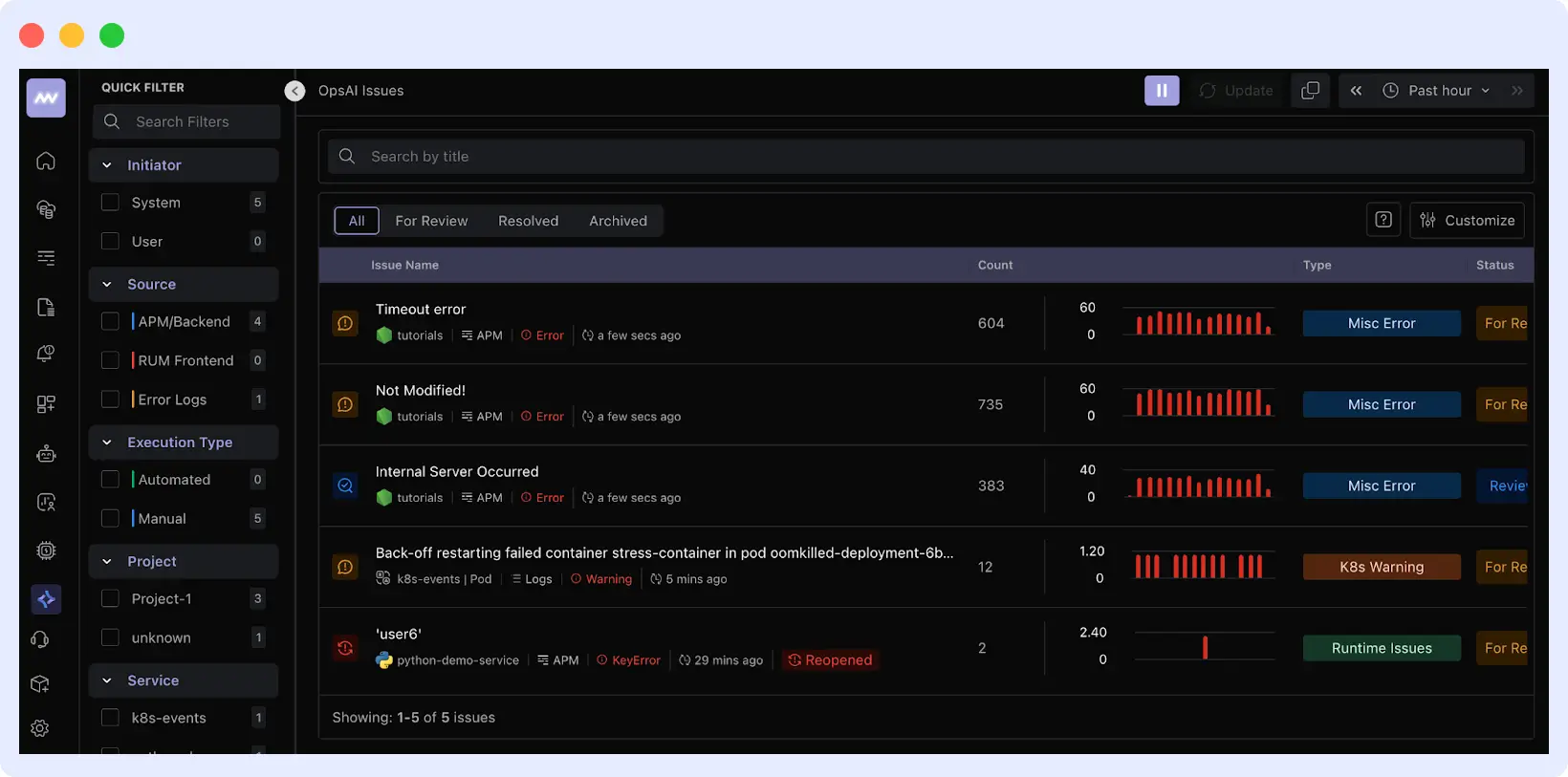
OpsAI monitors your application through the agent you installed. When errors occur, it automatically captures:
- Stack traces showing where the code failed
- Error logs with exception messages
- Request context (which endpoints, what data triggered the error)
Step 2: Analyze the Root Cause
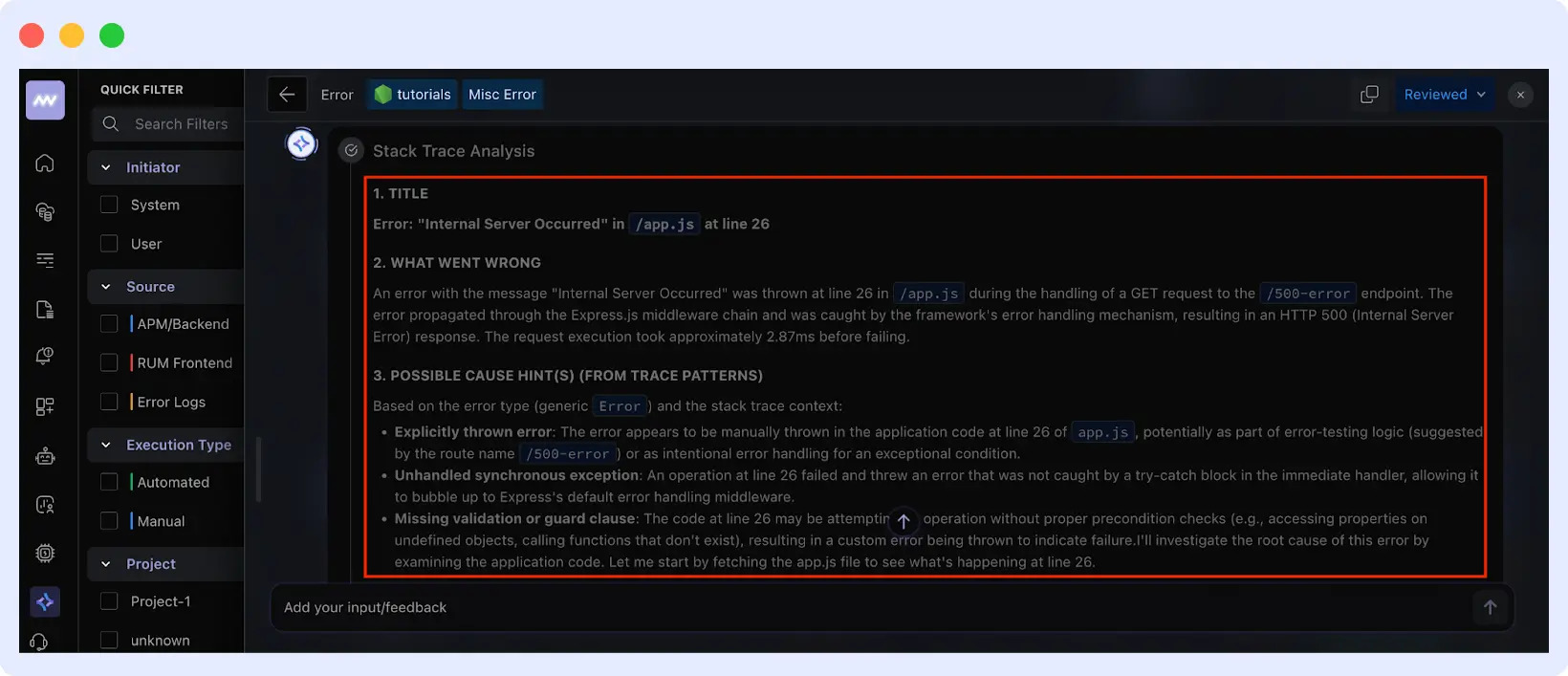
OpsAI connects to your GitHub repository and pulls only the files related to the error. It identifies:
- The exact problem: Internal server error at line 26 in app.js
- Why it’s happening
- What triggered it?
Step 3: Generate the Fix
OpsAI creates a solution based on your codebase and best practices. For example, it will include proper error handling to prevent crashes or write test cases to catch similar issues in the future.
Step 4: Creates a Pull Request
Finally, OpsAI creates a pull request in your repository with:
- The code changes (side-by-side difference)
- Explanation of what broke and why
- The specific commit that introduced the bug
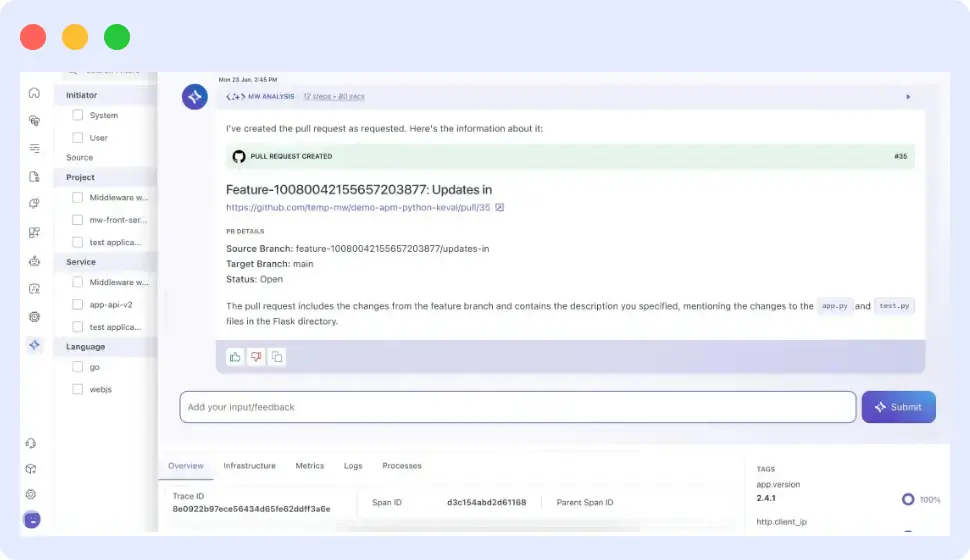
Your team can then review the PR and merge it. Normally, this would have taken about 2–3 hours to debug, but it will all happen within minutes with no effort on your part.
Watch how OpsAI detects, analyzes, and fixes errors in real time.
Why This Matters
OpsAI shifts engineers from reactive to proactive issue management. It handles diagnosis, context gathering, and initial fixes, reducing operational load and keeping your team focused on building.
Move from reactive firefighting to proactive operations with AI agents designed for real-world DevOps.
See How AI Agents Handle Real Production Issues
Curious how automated remediation works in practice? See OpsAI detect, analyze, and fix a live production error, from detection to pull request in minutes. Book a demo or start a free trial.
FAQs
What are common use cases of AI agents?
AI agents automate data entry, customer support, code deployments, system errors, cost optimization, and security monitoring.
How do AI agents differ from regular chatbots?
Chatbots wait for your questions and respond. AI agents work independently: they notice problems and fix them without waiting for instructions.
How do I know if my team needs an AI agent?
AI agents make sense when repetitive tasks eat up your time or you’re missing issues simply because there’s too much going on. They free you up to work on the stuff that really needs your attention.
Can AI agents integrate with existing tools?
Most modern agents connect to popular tools such as Slack, email, cloud platforms, and databases. Check if the specific agent supports your software before buying.
What are the security implications of AI agents?
Agents access your data and take actions in your systems, so they need proper controls. Look for ones that log actions, restrict sensitive access, and require approval for critical tasks.