


Summary: Podman and Docker both run OCI-compliant containers, but they solve the problem in fundamentally different ways: Docker centralizes everything through a root-privileged daemon, while Podman runs each container as a daemonless, rootless user process. That architectural split drives nearly every other difference in this comparison, from security posture to startup speed to Kubernetes alignment. Since Docker Desktop’s 2024 licensing changes, more teams are re-evaluating Podman as a serious, not niche, alternative.
TL;DR
- Architecture: Docker runs a central daemon (dockerd); Podman is daemonless, with each container running as an independent user process.
- Security: Podman is rootless by default with no privileged socket; Docker requires manual hardening to reach the same posture.
- Performance: Podman starts containers ~20–30% faster and uses ~15–20% less memory per container.
- Cost: Podman Desktop is free and open-source; Docker Desktop starts at $9/user/month for teams.
- Kubernetes fit: Podman has native pod support and a built-in podman generate kube YAML generator; Docker needs conversion tooling like Kompose.
- Ecosystem: Docker still wins on tooling breadth, Docker Hub, Compose maturity, and community size.
- The gap both share: Neither runtime gives you application-level observability — that requires an OpenTelemetry-native monitoring layer like Middleware on top of either one.
This guide compares both runtimes across seven dimensions, walks through a practical migration path, and covers the one problem neither runtime solves on its own: container observability.
What is Docker?
Docker is a container platform that packages applications and their dependencies into portable, isolated units. Introduced in 2013, it standardized container images and Dockerfiles into the industry default. According to Stack Overflow’s 2024 Developer Survey, Docker remains the most widely adopted container tool, used by more than 59% of respondents who work with containers.
How Docker’s architecture works
Docker uses a client-server model built around a central background process, the Docker daemon (dockerd). The CLI sends every docker run or docker build instruction to this daemon, which handles image pulls, container creation, networking, and volume management. The daemon typically runs with root privileges, powerful, but a single point of failure. If it stops, every container it manages stops with it.
Why Docker still dominates production
Docker Compose handles multi-service local development, Docker Hub is the largest public image registry, and Docker Buildx adds multi-platform builds. If your infrastructure already depends on Docker Compose, Swarm, or daemon-dependent tooling, migration carries real risk with limited upside unless you have a specific reason to switch. Whichever runtime you run in production, keeping an eye on daemon health and container resource usage matters. Our roundup of Docker monitoring tools covers the options across standalone hosts, Compose, and Kubernetes.
What is Podman?
Podman (Pod Manager) is a daemonless, rootless container engine developed by Red Hat. It is OCI-compatible and supports most Docker CLI commands via a simple alias, but the underlying process model is completely different.
How Podman’s architecture works
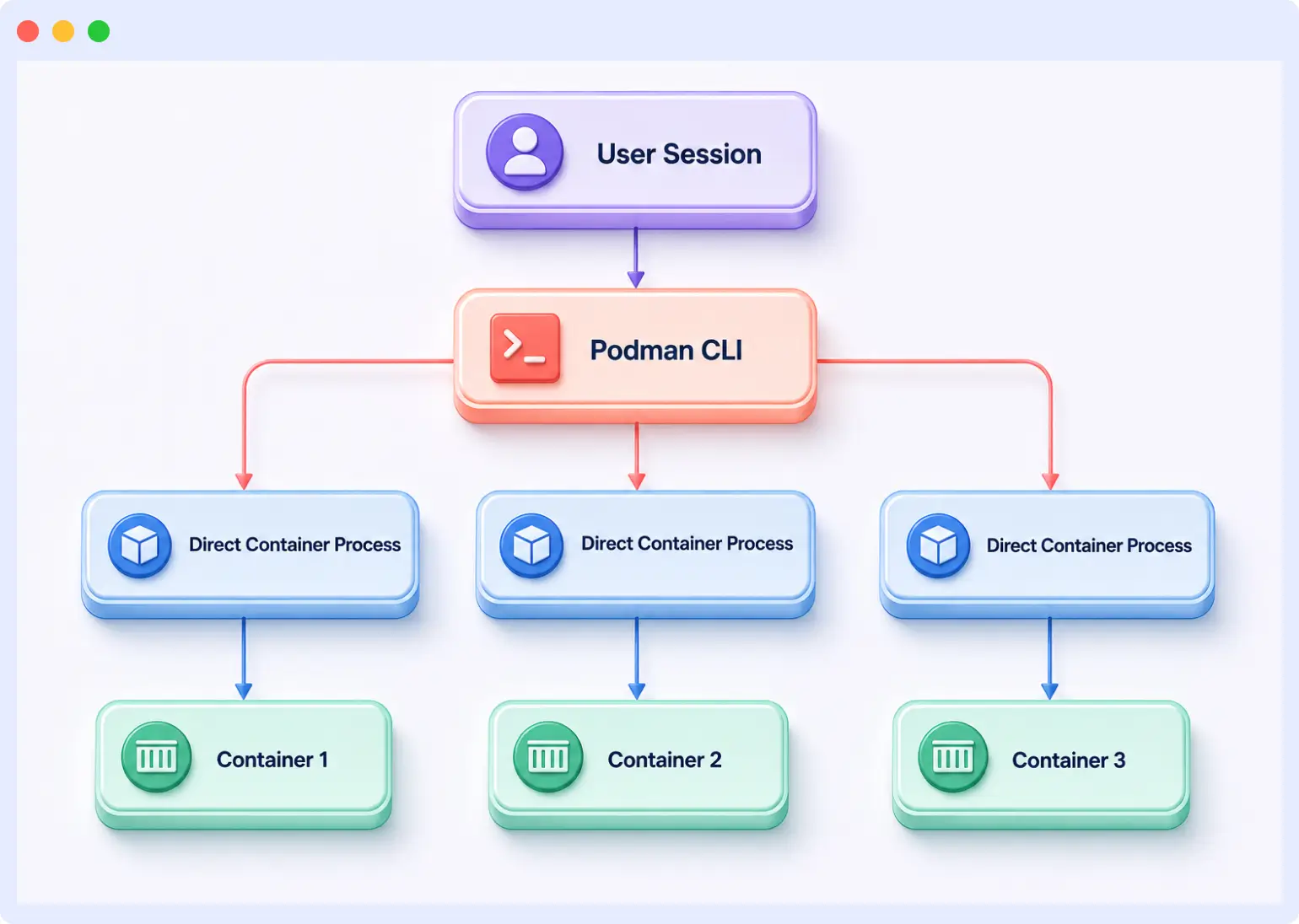
Every container Podman runs starts as a direct child process of your current user session: no background daemon, no privileged socket, no shared point of failure. If one container crashes, it does not take others down with it. Containers inherit the launching user’s privileges rather than root, which sharply limits the blast radius of a compromised container.
Podman also introduces pods as a first-class concept: groups of containers sharing a network namespace and communicating over localhost, mirroring the exact model Kubernetes uses in production. You can build and test pods locally, then export them straight to Kubernetes YAML with podman generate kube.
Who Podman is built for
Teams already running Kubernetes, regulated environments where rootless execution is a compliance requirement, and organizations reassessing Docker Desktop licensing costs. Podman is native to Red Hat, Fedora, and CentOS but works well on Debian, Ubuntu, and macOS via Podman Desktop.
Why this matters for observability: whichever runtime you pick, containers behave dynamically, starting, stopping, and scaling constantly. Middleware’s Kubernetes monitoring auto-discovers pods and nodes as they change, so you get full-stack visibility into containerized workloads without re-instrumenting every time your runtime layer shifts underneath you.
Podman vs Docker: 7 key differences
1. Architecture: daemon vs daemonless
| Aspect | Docker | Podman |
|---|---|---|
| Process model | Central daemon (dockerd) manages all containers | Each container is a child process of the launching user |
| Privileged socket | Yes, /var/run/docker.sock | No privileged socket |
| Single point of failure | Yes, daemon failure stops all containers | No, each container is independent |
| Startup overhead | Daemon adds background resource cost | No persistent background process |
Docker’s daemon model is why it is easy to get started, since one process manages everything. It is also why it creates systemic risk. Podman’s per-process model is harder to reason about initially but removes the shared failure point entirely.
2. Security: rootless vs root-by-default
| Security attribute | Docker | Podman |
|---|---|---|
| Default execution mode | Root, unless rootless mode is configured | Rootless by default |
| Kernel capabilities per container | 14 enabled by default | 11 enabled by default |
| Privileged daemon socket | Yes, a common attack vector | No daemon socket |
| SELinux / AppArmor | Optional configuration required | Enforced automatically if available |
| Container escape risk | Higher, daemon runs as root | Lower, scoped to user namespaces |
Docker can be hardened to match Podman’s default posture, but that takes deliberate configuration. Podman ships that way, which matters for teams targeting PCI-DSS, FedRAMP, HIPAA, or SOC 2. Red Hat’s own research documents that rootless containers measurably reduce attack surface versus Docker’s daemon-based default.
3. Performance: startup time and memory
| Workload type | Docker startup | Podman startup | Improvement |
|---|---|---|---|
| Small application | 0.9s | 0.7s | ~22% faster |
| Medium application | 1.2s | 1.0s | ~17% faster |
| Large application | 1.6s | 1.1s | ~31% faster |
| Database container | 1.3s | 1.0s | ~23% faster |
| Web server | 1.0s | 0.8s | ~20% faster |
Podman typically uses 15-20% less memory per container since there is no persistent daemon consuming baseline resources. At 200 builds a day, shaving 10-12 seconds per build recovers 30-40 minutes of pipeline time daily.
Why this matters for observability: CI/CD pipelines are where container performance regressions surface first. Middleware’s distributed tracing correlates build and deployment spans with downstream service latency, so a slow pipeline stage does not just get flagged, it gets traced to the exact service or dependency causing it.
4. Kubernetes integration
Docker’s workflow requires a translation step: build locally, write Kubernetes YAML separately, reconcile the two. Tools like Kompose convert Compose files to manifests, but imperfectly.
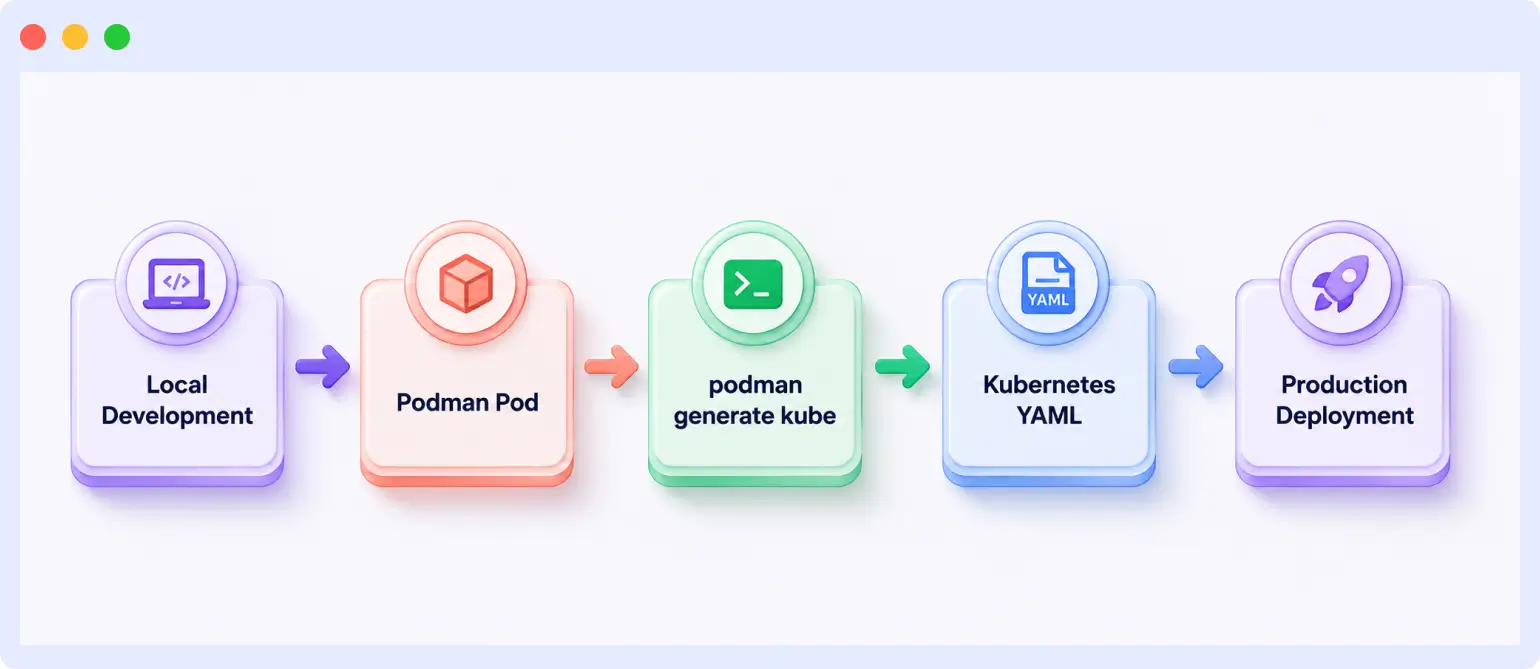
Podman’s workflow is natively aligned with Kubernetes. Group containers into a pod locally the same way Kubernetes does, then run podman generate kube to produce deployable YAML directly, reducing drift between development and production.
5. Desktop tools: cost and features
| Feature | Docker Desktop | Podman Desktop |
|---|---|---|
| Cost | Free personal use; $9-$24/user/month for teams | Free and open-source (Apache 2.0) |
| Interface quality | Polished, feature-rich, Docker Hub integration | Clean and functional, actively improving |
| Kubernetes support | Built-in (uses kind under the hood) | Native pod management, Kind/Minikube |
| Extension ecosystem | Mature, hundreds of extensions | Growing, smaller catalog |
| Resource usage | Higher overhead (background daemon) | Lower CPU/memory footprint |
| License | Commercial (Docker Subscription Agreement) | Open-source (Apache 2.0) |
A 50-developer team on Docker Team ($15/user/month) pays $9,000 per year for the desktop GUI alone. On Docker Business ($24/user/month), that is $14,400 per year. Podman Desktop costs nothing.
6. Docker Compose compatibility
Podman supports Compose workflows via podman-compose (community wrapper) or the native podman compose (v4.7+). Standard service, port, and volume definitions work without modification. Friction shows up at custom bridge networks, named volume drivers, and Docker-daemon-dependent plugins.
7. Orchestration support
Docker supports both Swarm and Kubernetes (via tooling). Podman’s story is Kubernetes-only, but podman generate kube and podman play kube make that a clean, native path rather than a workaround.
Full feature comparison: Podman vs Docker
| Category | Docker | Podman | Edge |
|---|---|---|---|
| Architecture | Centralized daemon (dockerd) | Daemonless, per-user processes | Podman |
| Default security | Root-level daemon required | Rootless by default | Podman |
| Container startup speed | ~1.0-1.6s average | ~0.7-1.1s average | Podman |
| Memory efficiency | Higher baseline overhead | 15-20% lower per container | Podman |
| Kubernetes alignment | Requires conversion tooling | Native pod model, YAML generator | Podman |
| Desktop tool cost | $9-$24/user/month (teams) | Free and open-source | Podman |
| Ecosystem maturity | Large: Hub, Compose, Swarm, extensions | Smaller but growing | Docker |
| Docker Swarm support | Yes | No | Docker |
| CLI familiarity | Industry standard | Docker-compatible (aliasable) | Docker |
| Compose compatibility | Native (docker compose) | Via podman-compose wrapper | Docker |
| OCI image compatibility | Yes | Yes | Tie |
| Dockerfile compatibility | Yes | Yes (minor rootless caveats) | Tie |
Security deep dive: which runtime is safer in 2026?
Docker’s daemon model creates a privileged socket (/var/run/docker.sock). Anything with access to it can spawn containers, mount host volumes, or escalate privileges, a common vector for compromised CI/CD jobs.
Podman eliminates that socket entirely. Containers are user-namespaced processes; even a compromised one is limited to that user’s permissions, not root-level system access. The kernel capability gap (11 vs 14) reinforces the principle of least privilege, by default, not as an opt-in.
For regulated environments (HIPAA, PCI-DSS, FedRAMP, SOC 2), Podman’s default posture requires less compensating-control documentation than Docker’s.
Why this matters for observability: runtime hardening reduces attack surface, but it does not replace detection. Middleware’s APM flags anomalous service behavior, unexpected process spawns, latency spikes, unusual outbound calls, before a container-level compromise becomes a production incident.
Migrating from Docker to Podman: a practical guide
Step 1: assess your environment
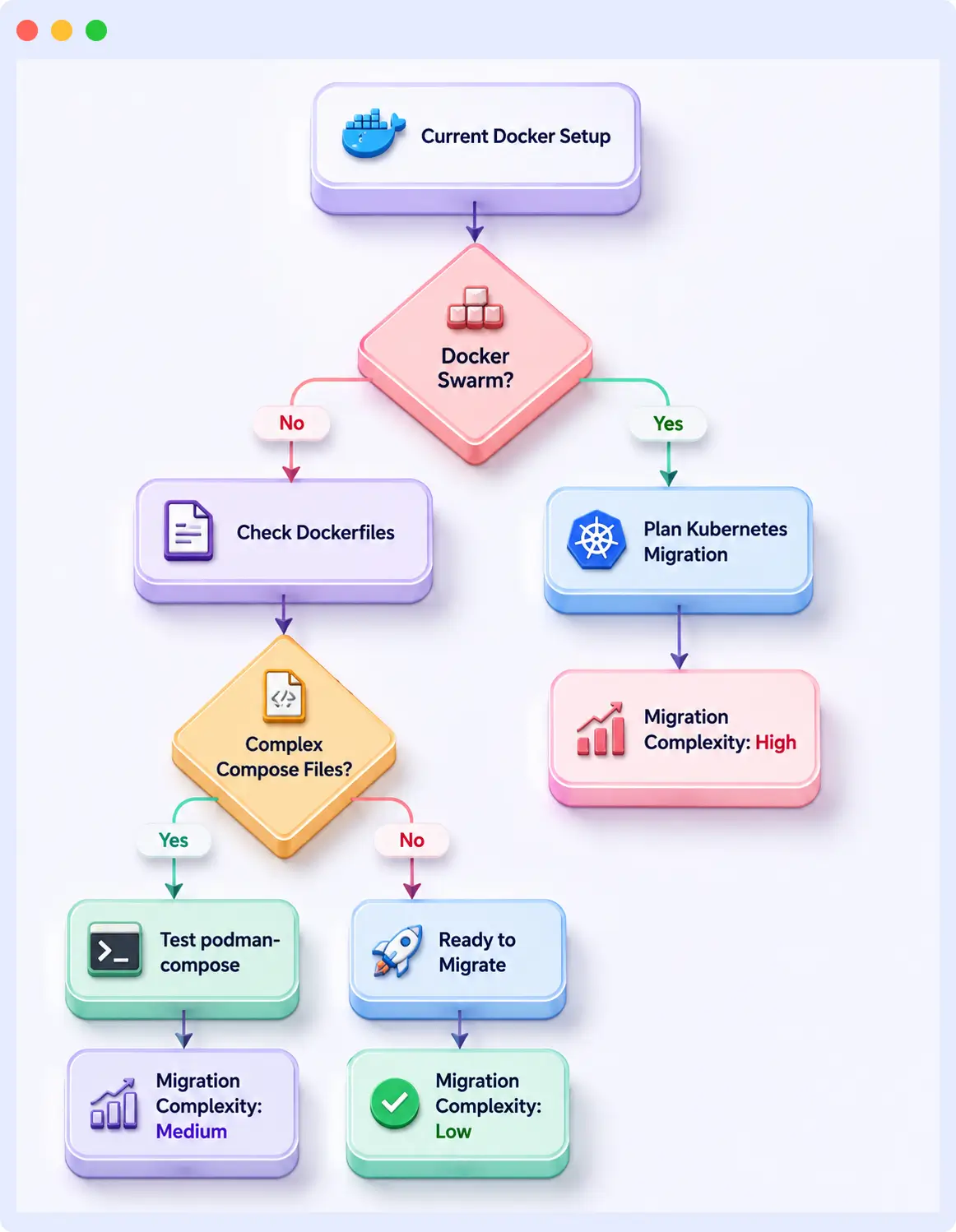
The complexity of your Docker setup determines how much work migration involves. Ask these questions first:
- Are you on Docker Swarm? Migrating to Podman means migrating to Kubernetes too, treat these as two separate projects.
- Do Compose files use custom bridge networks, named volume drivers, or third-party plugins? These are your likeliest friction points.
- Do Dockerfiles use USER root or install packages requiring root? Podman’s rootless default will surface these.
- Does CI/CD rely on Docker-in-Docker (DinD)? Podman needs rootless nested containers or Podman-in-Podman instead.
If your setup is standard Dockerfiles plus a simple Compose file with no Swarm dependency, expect one to two days of migration testing.
Step 2: install Podman and alias Docker
# Ubuntu/Debian
sudo apt-get install -y podman

# RHEL/Fedora
sudo dnf install -y podman

# Alias Docker CLI to Podman
echo "alias docker='podman'" >> ~/.bashrc
source ~/.bashrc
podman version
Step 3: test your existing Dockerfiles
podman build -t myapp .
podman run --rm -p 8080:8080 myapp
podman ps
Most Dockerfiles run unchanged. Files with USER root mid-build or root-dependent package installs need namespace adjustments or –privileged, treat that as a refactor signal, not a reason to add exceptions.
Step 4: adapt Docker Compose workflows
pip install podman-compose
podman-compose up

# or, Podman v4.7+
podman compose up
Step 5: update CI/CD pipeline configurations
podman login registry.example.com --username $USERNAME --password $PASSWORD
podman generate kube my-pod > k8s-deployment.yaml
Common migration issues and fixes
| Issue | Cause | Fix |
|---|---|---|
| Registry auth fails in CI | Podman stores credentials differently | Use podman login explicitly; update credential helpers |
| Volume mount permission errors | Rootless UIDs differ from host UIDs | Fix directory ownership; use :Z or :z SELinux labels |
| Service-to-service networking breaks | Rootless network model differs from Docker bridges | Use pods to share network namespaces |
| Dockerfile fails on package install | Assumes root; Podman is rootless by default | Refactor to avoid root; –userns=keep-id as a stopgap |
| Docker-in-Docker does not work | Podman has no daemon to nest | Use rootless Podman-in-Podman, or Kaniko/Buildah for CI builds |
Dockerfile compatibility: what changes and what does not
Most Dockerfiles work with Podman as-is, FROM, COPY, RUN, ENV, EXPOSE, and CMD all behave identically. The exceptions involve privilege assumptions:
# Works identically in both Docker and Podman
FROM node:20-alpine
WORKDIR /app
COPY package*.json .
RUN npm ci --production
COPY . .
EXPOSE 3000
CMD ["node", "server.js"]
# May need adjustment in Podman, root assumed mid-build
FROM ubuntu:22.04
USER root
RUN apt-get update && apt-get install -y build-essential
RUN useradd -m appuser
USER appuserMulti-stage builds, ARG configuration, and HEALTHCHECK all work unmodified. The main refactor, if needed, is removing unnecessary root assumptions, good practice regardless of runtime.
Observability: the layer that neither runtime provides
Container runtimes tell you that something is running, not why it is slow, which requests are failing, or which upstream service is causing cascading errors.
Podman’s daemonless model means ps, top, htop, and journald work without querying a daemon API, useful for host-level inspection. Docker’s daemon model routes observability tooling through the Docker API, which offers rich event streams but adds a dependency on daemon health. For a broader look at collecting this data across runtimes, see our comparison of container monitoring tools.
Neither replaces application-level instrumentation. In production, you still need:
- Centralized log monitoring across services and pods
- Metrics tied to application performance, not just container resource usage
- Distributed tracing to follow requests across container boundaries
- Alerting with enough context to route to the right team without paging everyone
Middleware is built on OpenTelemetry and unifies logs, metrics, and traces across your containerized stack, without switching agents when you move between Docker and Podman environments.
When to choose Docker vs Podman in 2026
Choose Docker if:
- You are running Docker Swarm and not moving to Kubernetes yet
- Your CI integrations and third-party tooling assume a Docker daemon
- Your Compose setups are complex and rework is not worth the disruption
- Your team’s Docker CLI muscle memory outweighs the migration benefit
- You depend on Docker Hub’s paid team and repo features
Choose Podman if:
- You have compliance mandates requiring rootless execution
- Docker Desktop licensing is a real cost concern at 20+ seats
- Kubernetes is your production target and you want local dev to match it
- You want reduced attack surface without manual hardening
- CI/CD needs faster startup and lower memory per build
- You are starting fresh with no legacy Docker dependencies
Decision framework
| Consideration | Choose Docker if… | Choose Podman if… |
|---|---|---|
| Security posture | Root daemon acceptable; hardening is manual | Rootless by default is a requirement |
| Licensing budget | Desktop licensing is not a concern | Open-source-only toolchain preferred |
| Orchestration | You use Docker Swarm | Kubernetes is your production target |
| Existing investment | Deep Docker ecosystem dependency | Starting fresh or willing to refactor |
| CI/CD performance | Pipeline speed is not a bottleneck | Faster startup and lower memory matter |
| Team familiarity | Deep Docker knowledge; switching has friction | Team can learn; CLI alias bridges the gap |
Conclusion
The Podman vs Docker decision in 2026 is not about universal technical superiority, it is about which trade-offs match your team’s actual constraints. Docker wins on ecosystem breadth and decade-plus of tooling maturity. Podman wins on rootless security, Kubernetes alignment, daemonless stability, and cost. What neither runtime solves is observability: the work of correlating logs, tracing requests, and surfacing the metrics that matter still requires instrumentation above the container layer.
Running containers in production and need full-stack visibility? Middleware is a full-stack cloud observability platform built on OpenTelemetry that works across Docker and Podman environments, no agent switching required. Start your free 14-day trial.
Also worth reading: Best OpenTelemetry Tools 2026
FAQs
Can Podman fully replace Docker?
For most teams, yes. Podman supports the same image formats, Docker-compatible CLI commands via alias, and Compose workflows via podman-compose or native podman compose. The exceptions are Docker Swarm support and third-party tooling that assumes a running Docker daemon.
Does Podman work with Docker Hub?
Yes. Pull and push without configuration changes, use podman pull docker.io/library/nginx or set it as the default registry in /etc/containers/registries.conf.
Is Podman more secure than Docker?
By default, yes, rootless execution and no privileged daemon socket. Docker can match this with manual hardening, but Podman ships that way, requiring fewer compensating controls in regulated audits.
Does Podman support Docker Compose?
Yes, via podman-compose or native podman compose (v4.7+). Standard configs work well; complex network drivers or Swarm-specific keys may need adjustment.
How do I switch from Docker to Podman without breaking everything?
Start with alias docker=’podman’, test Dockerfiles and Compose files against real workloads, fix the handful of edge cases that surface, then roll out to CI and developer machines incrementally.
Which is better for Kubernetes in 2026?
Podman. Its native pod model mirrors Kubernetes semantics, and podman generate kube removes the manual translation step Docker workflows require.
What happens to my containers if Docker or Podman crashes?
Docker: all containers stop, since they depend on the daemon. Podman: containers are independent processes and keep running even if Podman itself is updated or restarted.